Every episode you convert gets the same set of written results, generated from its transcript. You find them on the episode's Results Page, in the Written content tab.
How it works
- Open your Dashboard and click the episode.
- The Results Page opens on the Written content tab. Each result is a card.
- Click a card to open it, read the full text and copy it.
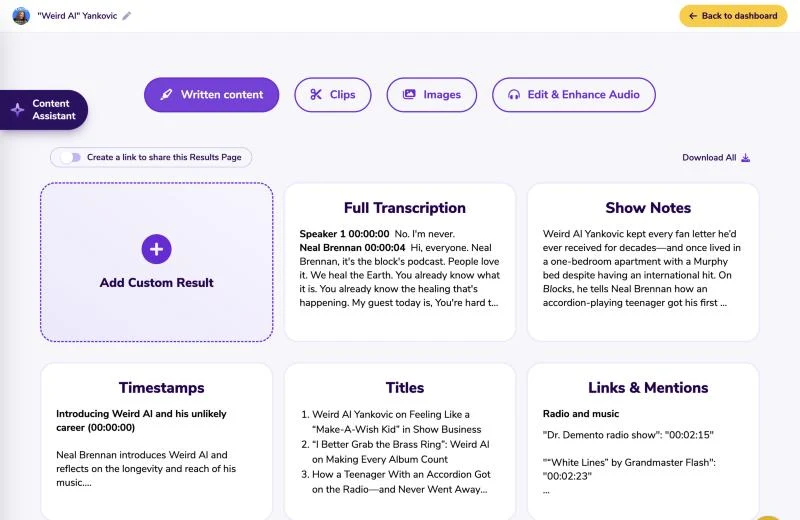
The results
| Card | What it contains |
|---|---|
| Full Transcription | The whole episode as text, split by speaker, plus an SRT subtitle file |
| Show Notes | A short episode description |
| Timestamps | Chapters with start times, ready to paste into a YouTube or Spotify description |
| Titles | Several title options for the episode |
| Links & Mentions | People, products and resources mentioned in the episode |
| Keywords | Keywords you can use as YouTube tags or hashtags |
| Blog Post | A long-form article based on the episode |
| Newsletter | An email newsletter about the episode |
| LinkedIn & Facebook | Short posts for sharing the episode or its clips |
| Tweets | Posts for X |
| Quotes | Notable lines from the episode |
| Bullet Points | The main topics as a list |
The other tabs on the same page hold the rest of the episode's output: Clips, Images (Thumbnail Maker and Quote Image) and Edit & Enhance Audio.
Good to know
- To get a format that is not in the list, such as a LinkedIn post in your own style or a news lead, use Add Custom Result. See Create a custom result.
- To change how all results are written for a show, use Personalize AI on the show's folder. See Folders and Personalize AI.
- To ask follow-up questions about the episode, or for more titles or quotes, open the Content Assistant (Pro and above). See Content Assistant.
- To download everything at once, click Download All. See Download all content.
Troubleshooting
- A card says "Generating". The result is still being written. Wait a minute and reload the page.
- Names are misspelled in every result. Fix them in the transcript and add them to Fix Transcript Misspells in Personalize AI so future episodes get them right. See Fix speaker names and spelling.