TikTok caption generator for the words on screen
Most TikToks are watched with the sound off. Upload your video or episode and Podsqueeze adds animated, word-by-word captions in the TikTok style, sized and placed for the vertical feed.
Caption presets
Used by podcasters, networks and media around the world












How it works
From upload to a captioned TikTok
The captions are written, timed and styled for you.
Upload the video
A clip you filmed, a full episode or a YouTube link.
Choose a TikTok-style look
Bold words, a coloured spoken word, one line at a time.
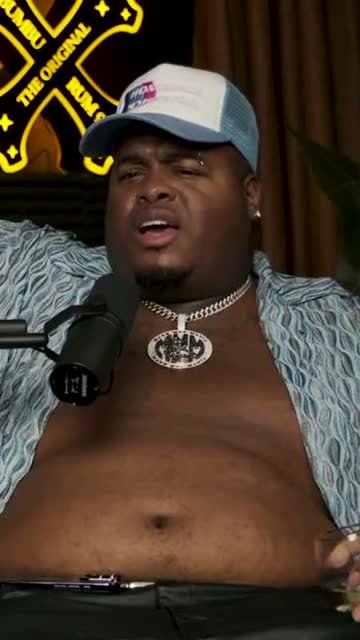
Where crunk really started
Download and post
A 9:16 MP4 with the captions already in it.
AI agent
Your TikTok editor, on call
Ask it to find TikToks in a long video or to change one you're working on. It shows every change it makes.
It finds TikToks
Ask for the moments that would work on TikTok
“Three funny moments under 30 seconds.” It reads the whole video and returns captioned clips that start strong.
It edits them
Then ask for changes
A different caption style, a name on screen, a shorter cut. Each change is listed with an undo.
Knows TikTok formats
Vertical, short, captioned.
Always reversible
Every change can be undone.
15+ languages
Captions in 15+; requests in 15.
Editor
Tweak the TikTok before you post
Change the caption style, move the captions, trim words in the transcript or add a name on screen, all in one editor.
Swipe to see the whole editor →
1Captions you can move
Drag them clear of TikTok's buttons.
2Trim by text
Delete words, the video follows.
3Names on screen
Add a lower third in a click.
4Same look every time
Save your caption style as a layout.
The TikTok look
Bold, moving captions people expect on TikTok
Big words, a coloured word that follows the voice, short lines that are easy to read on a phone. Pick the preset that suits your videos and keep it on all of them.
- Highlight, pop and single word styles
- Two or three words per line
- Your colours and font
Caption presets
Vertical
Built for the TikTok screen
Every clip is framed 9:16 with the speaker in view, ready for the For You feed.
Filmed wide? It still fills the phone
If your video is horizontal, Podsqueeze crops it to 9:16 around whoever is speaking, so the TikTok fills the screen and the captions sit under a face.
Two people talking, both on screen
For interviews and conversations, stack both speakers in the vertical frame with the captions between them.
Get the words right
Typos and wrong names, fixed in the transcript
Slang, names and brand words are where auto-captions slip. Correct them once in the transcript and the captions update; hide a word you don't want on screen.
- Correct a word in seconds
- Hide words from the captions
- Ask the assistant to cut fillers
“Weird Al” Yankovic 12:44
✦ Cut the “um”sSo, um, I talked to him on the phone and I said, listen, I'd like to do a parody of your song. You know, and he said, oh, is it gonna be a song about food? This was the first time Nirvana played Saturday Night Live.
Posting
Download, post, repeat
Download the captioned 9:16 MP4 and post it on TikTok. The same file works for Instagram Reels, and you can schedule it to YouTube Shorts from Podsqueeze.
- Captioned 9:16 MP4s
- Same file for Reels
- Scheduling to YouTube Shorts
YouTube Shorts
Off the Record · connected
Mon
Tue
Wed
Thu
Fri
Extras
Little things TikTok viewers notice
Recognisable captions
The same colours and font on every TikTok you post.
Square too
A 1:1 version for feeds, from the same clip.
Background music
Royalty-free tracks under the voice.
Titles for each clip
A short title and hook to start your post text.
Why Podsqueeze
Captioning TikToks with Podsqueeze vs in the app
| Feature | Podsqueeze | Basic auto-captions |
|---|---|---|
| Animated word-by-word styles | Basic | |
| Your own colours and font, saved | ||
| Horizontal video cropped to 9:16 | ||
| Finds TikTok moments in long videos | ||
| Edits by asking in plain words |
Loved by the people who make the shows
What is a TikTok caption generator?
On TikTok, "caption" can mean two things: the text you write under your post, or the words that appear on screen while you talk. This page is about the second. A TikTok caption generator transcribes your video, times every word and puts the captions on screen, usually in a bold, animated style, so people scrolling with the sound off still get the message.
How to add captions to a TikTok video
- Upload your video. Filmed vertically or horizontally, short or long.
- Let the AI transcribe it. Every word is timed to your voice.
- Pick a caption style. Highlight, pop or single word suit most TikToks.
- Fix any word. Edit names and slang in the transcript.
- Download the MP4. Post it on TikTok with the captions already in the video.
Tips for TikTok captions
- Keep lines short. Two or three words at a time are easier to read while scrolling.
- Stay clear of the interface. Keep captions away from the buttons on the right and the post text at the bottom.
- Use one accent colour. The same colour for the spoken word makes your videos recognisable.
- Hook in the first line. The first words on screen decide whether people keep watching.
TikTok's built-in captions vs Podsqueeze
TikTok's own auto-captions are quick but plain, and they only work inside the app. Podsqueeze burns animated captions into the video in your style, crops horizontal footage to 9:16 and can find TikTok-ready moments in a long recording. The same file then works on Instagram Reels and YouTube Shorts.
Why creators caption TikToks with Podsqueeze
You get styled, animated captions without editing word by word, a saved look for every video and a quick way to turn long videos into TikToks. There's a free plan to caption your next one.
FAQ
TikTok captions, answered
Can't find what you're looking for? Our team answers within a day.
Is this for the text of my TikTok post?
No. This page is about on-screen captions, the words that appear in the video as people speak. Podsqueeze does give each clip a short title and hook you can use as a starting point for your post text.
How do I add captions to a TikTok video?
Upload the video to Podsqueeze, pick a caption style and download the MP4. The captions are already in the video, so you post it to TikTok as it is.
Can I use my own font and colours?
Yes. Choose the font, the colour of the spoken word and the text colour, and save them as a layout for every TikTok.
Will the captions cover TikTok's buttons?
You can drag the captions anywhere on the frame, so you can keep them clear of the buttons on the right and the text at the bottom.
Is it free?
Yes. The free plan lets you caption videos with a small watermark and includes the Classic and Reveal styles. Pro removes the watermark and unlocks all styles and fonts.
Your next TikTok, captioned before you post it
Upload a video or an episode and download it with captions.
Free plan · No credit card · Made for 9:16