Animated captions that move with the voice
Each word lights up, pops or appears the moment it's spoken. Pick one of six styles, make it yours with your colours and font, and every clip from your episode follows it.
Caption presets
Used by podcasters, networks and media around the world












From plain to animated
Three choices, then every clip is styled
Choose once; the look carries to every clip.
Choose a style
Six presets, each previewed on your own clip.
Set colour and font
The spoken word, the rest of the text, the typeface.
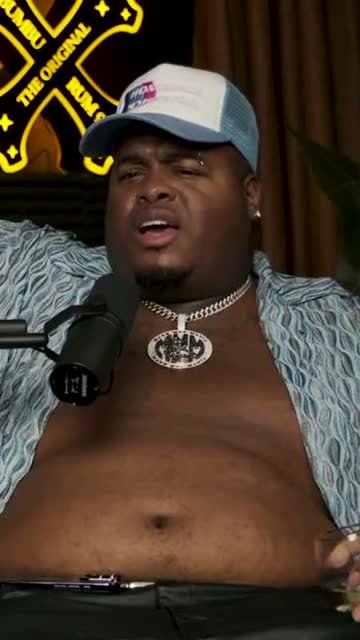
Where crunk really started
Save it as your look
Every new clip starts with the same captions.
AI agent
Ask for a look, get it on every clip
Describe the caption style you want, or ask for clips first. The agent does both, and shows what it changed.
It finds the clips
Clips worth animating
“Three short moments with a strong opening.” It finds them in the whole episode, ready for your caption style.
It sets the style
The caption look, in a sentence
Ask for a different preset, colour or size and see it on the clip at once. Every change is listed; undo is one click away.
Knows captions
Presets, colours, fonts and sizes.
Leaves a trail
You can see and undo each change.
Any of 15 languages
Ask the way you'd say it.
Fine control
When you want to tweak the animation by hand
Every preset can be adjusted in the Edit panel; drag the captions on the frame to place them; save the result as a layout.
Swipe to see the whole editor →
1Live previews
Hover a style to see it play.
2Spoken-word colour
The word being said, in your colour.
3Place it anywhere
Drag and resize the captions on the frame.
4One saved look
Every new clip uses your style.
Six presets
Pick the motion, not just the font
Highlight puts a box behind the spoken word. Pop makes it jump. Single word shows one big word at a time. Reveal fills words in as they're said. Classic and minimal keep things calm.
- Every style previewed on your clip
- Switch styles in one click
- Each style keeps your colours
Caption presets
Layout
Animated captions, placed with the picture in mind
The frame keeps the speaker visible and the captions where they read best, with one speaker or two.
Motion in the captions, calm in the frame
While the words animate, the camera stays steady on whoever is talking, so the clip never feels busy.
Animated captions between two faces
With two speakers stacked, the animated line sits in the middle, so viewers read and watch both reactions at once.
Every word counts
Choose which words appear at all
Animated captions draw the eye to every word, so the words matter. Fix a name in the transcript, hide an aside from the captions, or ask the assistant to cut the filler words.
- Corrections show up straight away
- Hide a word but keep it in the audio
- Fillers cut when you ask
“Weird Al” Yankovic 12:44
✦ Cut the “um”sSo, um, I talked to him on the phone and I said, listen, I'd like to do a parody of your song. You know, and he said, oh, is it gonna be a song about food? This was the first time Nirvana played Saturday Night Live.
Audio episodes
Animated captions on audio, too
Audio-only episodes become audiograms, with your cover, a moving waveform and the same animated captions on top.
- The same six styles
- A waveform that moves with the voice
- Vertical, square and wide

The one email that grew our show
The Long Table · Ep. 18
We
The one email that grew our show
The Long Table · Ep. 18
We
Export
The animation is part of the video
The animated captions are rendered into the MP4, so they look the same on TikTok, Reels, Shorts and LinkedIn. Schedule straight to YouTube Shorts if you like.
- Rendered into the MP4
- Identical on every platform
- YouTube Shorts scheduling
YouTube Shorts
Off the Record · connected
Mon
Tue
Wed
Thu
Fri
Details
Animated, but never messy
Your typeface
Montserrat, Inter, Poppins and more.
Any frame
The animation adapts to 9:16, 1:1 and 16:9.
Room for music
Background tracks sit under the voice.
Balanced lines
Words grouped by meaning, never a lone word.
Why Podsqueeze
Animated captions vs keyframing them yourself
| Feature | Podsqueeze | Keyframing by hand |
|---|---|---|
| Every word timed to the audio | By hand | |
| Six ready-made animations | Build each one | |
| Change the style for every clip at once | ||
| Fix a word, the animation follows | ||
| Style by asking an assistant |
Loved by the people who make the shows
What are animated captions?
Animated captions are on-screen captions that move in time with the speech. Instead of a full line appearing at once, the word being spoken is highlighted, enlarged, shown alone or filled in. It's the look you see on most successful short videos, because it gives viewers who watch on mute something to follow.
The six caption styles
- Highlight: a coloured box sits behind the spoken word. Clear and easy to read.
- Pop: the spoken word grows and changes colour. Lively, good for energetic speakers.
- Single word: one big word at a time. Punchy, best for short lines.
- Reveal: words fill with colour as they're said. Smooth and calm.
- Classic: the spoken word changes colour inside a steady line.
- Minimal: just the text, no motion, for serious topics.
How to add animated captions to a video
- Upload your video or episode. Or paste a YouTube link.
- Open a clip and pick a style. Hover each preset to see it play.
- Set the colours and font. Spoken word, text and typeface.
- Place the captions. Drag them where they read best on the frame.
- Export. The animation is rendered into the MP4.
Tips for animated captions that read well
- Keep two or three words on screen at a time; the eye can't follow long lines in motion.
- Pick one accent colour for the spoken word and use it on every clip.
- Use a bold, rounded font; thin fonts disappear on busy backgrounds.
- Keep captions low in the frame, clear of the face (in split screen they sit between the faces).
Why animate captions with Podsqueeze
Every word is timed to the audio automatically, lines are split by meaning, and the same style applies to every clip from your episode. When you want to change something, you can ask the assistant or adjust it yourself. Try the styles on the free plan.
FAQ
Animated captions, explained
Can't find what you're looking for? Our team answers within a day.
What are animated captions?
Captions that move with the speech. The word being said is highlighted, enlarged, shown on its own or revealed as it's spoken, instead of the whole line appearing at once.
Which animation styles are there?
Highlight, pop, single word and reveal animate the spoken word; classic and minimal are calmer. The free plan includes Classic and Reveal, and the Pro plan unlocks every style and font.
Do animated captions really help?
Many people watch short videos with the sound off. Moving captions give the eye something to follow and make it easier to keep reading until the end.
Can I use my brand colours and font?
Yes. Set the colour of the spoken word, the colour of the text and the font, then save it as a layout so every clip matches.
Will the animation look the same on every platform?
Yes. The captions are rendered into the video file, so TikTok, Instagram Reels, YouTube Shorts and LinkedIn all show exactly what you see in the editor.
Give your next clip captions that move
Upload an episode, pick a style and watch the words come alive.
Free plan · No credit card · Synced to every word