The Content Assistant is a chat that knows the full transcript of one episode. Ask it for quotes, titles, takeaways or angles, check SEO keywords, or look up facts on the web. It is available on Pro and above.
Steps
- Open the episode's Results Page.
- Click Content Assistant. A panel opens on the left.
- Type your question in Ask anything about this episode..., or click one of the suggestions:
- Find the strongest angles
- Find SEO keyword opportunities
- Fact-check this episode
- Pick the best quotes from the guest
- Copy what you need from the answer. You can expand the panel for longer answers, and start a fresh conversation at any time.
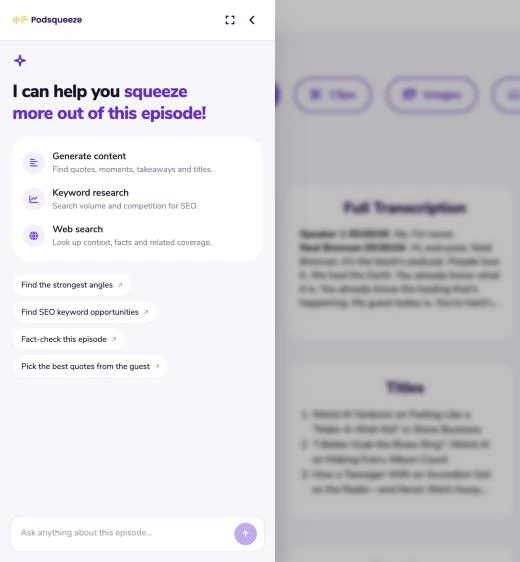
What it can do
- Generate content: find quotes, moments, takeaways and titles in the episode.
- Keyword research: search volume and competition for SEO keywords, so you can see which ones are worth targeting.
- Web search: look up context, facts and related coverage of what was discussed.
Limits
- Pro and above. On Free and Starter the panel opens, but sending a message shows "Chat with transcripts is available on Pro plans and above." with an Upgrade button. See /pricing/.
- The assistant works on one episode. To ask questions across every episode of a show, use Chat with all episodes on the folder. See Chat with all episodes.
- The assistant needs the episode's transcript, so it is only useful once processing has finished.
Good to know
- Answers are not saved as result cards. To generate a format on every new episode automatically, create a custom result instead. See Create a custom result.
- Check facts from Web search before publishing them, as you would with any source.