The YouTube clip maker that turns one link into a week of Shorts
Paste a YouTube link to your podcast, interview or livestream. Podsqueeze watches the whole video, cuts the best moments into vertical clips with captions, and lets you edit them by asking.
✦Reading the episode… 0 of 58 min
Used by podcasters, networks and media around the world












How the YouTube clip maker works
From a YouTube link to Shorts in three steps
Nothing to download, re-upload or crop by hand.
Paste the YouTube link
Any video on your channel, even hours long. Or upload the file if you have it.
Pick from the clips it found
Each one framed on the speaker, captioned and given a title.
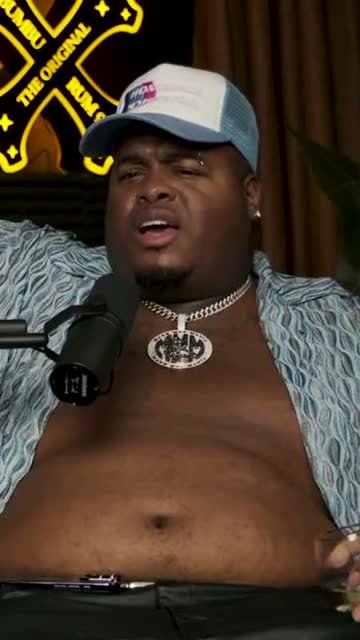
Where crunk really started
Post them back to YouTube
Schedule them as YouTube Shorts, or download MP4s for TikTok and Reels.
AI agent
Tell it what to clip from your video
Name a topic, a guest or a length. It watches the whole YouTube video, finds those moments and edits them when you ask.
It finds the clips
Ask for the parts worth a Short
“The three funniest moments.” “Everything about pricing, under 45 seconds.” It comes back with clips that make sense on their own, each with a title and a hook.
It edits them
Ask for a change, watch it happen
Captions, lower thirds, music, the cut itself. Every change is listed, and one click undoes it.
Watches the whole video
A moment from minute 3 or from minute 93 of a livestream.
Shows its work
Nothing changes without a note saying what changed.
Speaks your language
Ask in English, Portuguese, Spanish and 12 more.
The editor
Fine-tune every clip before it goes back to YouTube
Ask the assistant, or do it yourself. Cut words in the transcript, move elements on the timeline and change any setting, all on the same clip.
Swipe to see the whole editor →
1Ask or click
The assistant makes the change, or shows you where the setting is.
2Edit the words, edit the video
Delete a sentence in the transcript and it's gone from the clip.
3A track for everything
Captions, lower thirds, music and your logo, each on the timeline.
4Your channel's look, saved
Save a layout once and every new clip starts with it.
Captions for the Shorts feed
Captions for people watching on mute
Most Shorts start playing without sound. Word-by-word captions in the styles that work on YouTube Shorts, TikTok and Reels keep people reading until the end.
- Highlight, pop, single word, reveal and more
- Your colours and font on every clip
- Correct a word once, the caption follows
Caption presets
Made for vertical
A horizontal video, made for a vertical feed
Wide YouTube shots become 9:16 clips on their own. Follow whoever is speaking, or show two people at once.
Your 16:9 video, cropped to 9:16 for you
YouTube videos are wide; Shorts are tall. Podsqueeze finds who is talking from the voice and the lips and keeps them in the middle of the frame, with calm, steady moves.
Interview clips with both faces on screen
When a guest and a host are talking back and forth, stack them one above the other, each face centred, so viewers see the reaction as well as the answer.
Edit the words
Trim the “ums” before the clip goes live
Every clip comes with its transcript. Cut a word and it's gone from the video, ask the assistant to drop the filler words, or let the clip run one sentence longer.
- Ask the assistant to cut the fillers
- Fix a misheard name once
- One sentence earlier or later
“Weird Al” Yankovic 12:44
✦ Cut the “um”sSo, um, I talked to him on the phone and I said, listen, I'd like to do a parody of your song. You know, and he said, oh, is it gonna be a song about food? This was the first time Nirvana played Saturday Night Live.
Back to YouTube
Back on your channel as Shorts
Connect your channel once and schedule the clips as YouTube Shorts, a day and time for each. Or download the MP4s for TikTok, Reels and LinkedIn.
- Schedule straight to YouTube Shorts
- A day and time for every clip
- MP4 downloads for TikTok and Reels
YouTube Shorts
Off the Record · connected
Mon
Tue
Wed
Thu
Fri
For your channel
Everything a channel needs from one link
Your channel's branding
Your colours, fonts, logo and lower thirds on every Short.
Shorts, square and wide
Switch between 9:16, 1:1 and 16:9 and every layer adapts.
Music for your Shorts
Royalty-free tracks, mixed under the voices.
Chapters and a description
Timestamps and a description for the full video, from the same link.
Why Podsqueeze
Clipping YouTube videos without the timeline
| Feature | Podsqueeze | Download and edit |
|---|---|---|
| Starts from a YouTube link | ||
| Finds the best moments for you | By hand | |
| Crops 16:9 to 9:16 around the speaker | By hand | |
| Word-by-word animated captions | Basic | |
| Edit by deleting words in the transcript | ||
| Edit by asking an AI assistant | ||
| Schedules clips as YouTube Shorts |
Loved by the people who make the shows
What is a YouTube clip maker?
A YouTube clip maker turns a long YouTube video, like a podcast episode, an interview or a livestream, into short vertical clips for YouTube Shorts, TikTok and Instagram Reels. You paste the link, and the tool does the slow parts: it reads the transcript, picks the moments that work on their own, crops the video to 9:16 around the person speaking and adds captions.
It's the fastest way to get more out of videos you've already published. One long upload can become a week of Shorts that send new viewers back to the full video.
How to clip a YouTube video into Shorts
- Copy the link of your YouTube video. Podcasts, interviews, webinars and livestream recordings work best.
- Paste it into Podsqueeze. No need to download anything. The AI watches the whole video and suggests the best moments, each with a title and a hook.
- Check the framing and the captions. The camera follows whoever is talking. For a conversation you can switch to split screen and show both people at once.
- Edit by chatting or in the transcript. Ask the assistant for a shorter cut, yellow captions or a lower third, or delete words in the transcript and they're gone from the video.
- Post the clips. Schedule them as YouTube Shorts from Podsqueeze, or download MP4s for TikTok and Reels.
Which YouTube videos make the best clips?
- Podcasts and interviews. Long conversations are full of stories, opinions and answers that stand on their own.
- Livestreams. Hours of footage nobody will rewatch, with a few moments worth a second life.
- Webinars and talks. Short, useful tips that work as standalone Shorts.
- Tutorials. One clear step at a time, with captions for people watching on mute.
Clip your own videos, or ones you have permission to use
Clipping works best on content you own: your channel, your podcast, interviews you recorded, or a client's channel you manage. If a video belongs to someone else, ask before you post clips from it.
Why creators clip their YouTube videos with Podsqueeze
Podsqueeze was built for long conversations. It understands videos with more than one person, keeps everyone in frame, writes captions that keep people watching and lets you edit by simply asking. There's a free plan to try it on your next video.
FAQ
Questions, answered
Can't find what you're looking for? Our team answers within a day.
How does the YouTube clip maker work?
Paste the link to a YouTube video. Podsqueeze transcribes it, finds the moments that work on their own, crops them to vertical around the speaker and adds animated captions. You get clips ready to post, and an editor to change anything.
Do I need to download the video first?
No. Paste the YouTube link and Podsqueeze gets the video for you. If you have the original file, you can upload it instead.
Can I clip any YouTube video?
Clip videos you own or have permission to use, like your own podcast, interviews you recorded or a client's channel you manage.
Is the YouTube clip maker free?
Yes. The free plan lets you make clips with a small watermark. Paid plans remove the watermark and give you more clips and minutes every month; the editing assistant is on Pro.
Can I post the clips back to YouTube as Shorts?
Yes. Connect your channel and schedule clips as YouTube Shorts from Podsqueeze. You can also download MP4 files for TikTok, Instagram Reels and LinkedIn.
Does it work for long videos and livestreams?
Yes. Hours-long podcasts, interviews, webinars and livestream recordings all work. The longer the video, the more moments there are to choose from.
Your next ten Shorts are already on your channel
Paste a YouTube link and let the clip maker do the rest. Clips, captions and a teaser in minutes.
Free plan · No credit card · Works from a link