You can fix a transcript in the Transcription & SRT window: rename a speaker everywhere at once, edit the text of any block, or replace a misspelled word across the whole episode. To stop the same names being misspelled in future episodes, add them under Fix Transcript Misspells in the folder's Personalize AI settings.
Fix this episode
-
Open the episode's Results Page and click the Full Transcription card.
-
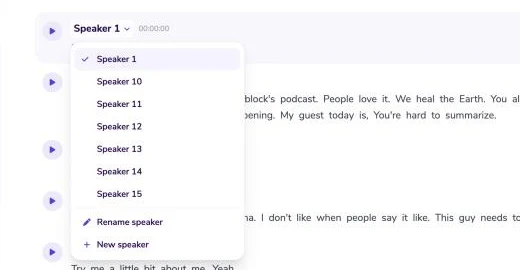
Rename a speaker: click the speaker's name above any block, choose Rename speaker, type the name and click Save. Every block from that speaker changes.
-
Fix a block said by someone else: click the speaker's name on that block and pick the right speaker from the list, or choose New speaker to add one for that block.
-
Edit the text: click the pencil next to a block, correct the text, and click Save.
-
Fix a word everywhere: click the search and replace icon ("Search / replace"), type the misspelled word, type the correct one in "Replace with…", and click Replace one or Replace all.
Your changes are saved to the episode and are used in the TXT, PDF and DOCX downloads.
Fix future episodes
- On your Dashboard, open the podcast's folder and click Personalize AI.
- Under Fix Transcript Misspells, type the words the AI gets wrong, such as guest names, your show's name or brand terms. Separate several words with commas and press Enter, or click Add Word.
- Click Save & Close.
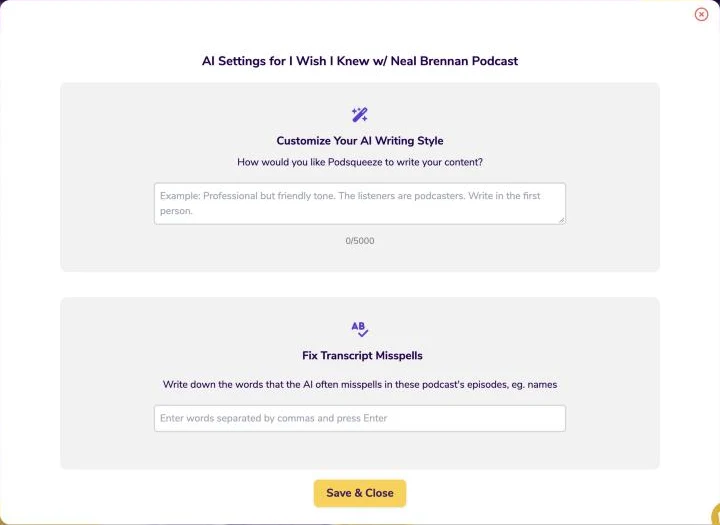
Podsqueeze passes these words to the transcription for every new episode you convert into that folder.
Limits
- Spelling list: Free and Starter can save one word per folder. Pro and above can save a full list.
- The spelling list only affects new episodes. Episodes already converted keep their transcript; fix those with the steps above.
- Each folder has its own list, so add the words to every show where they appear.
Troubleshooting
- The SRT file still has the old spelling. Edits change the transcript text, not the SRT subtitle file, which keeps the original transcription.