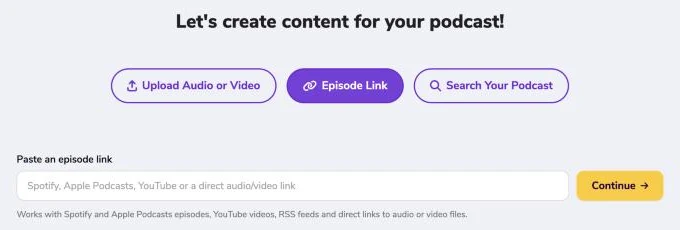
Yes. Click Convert Audio or Video, choose Episode Link, paste the Spotify or Apple Podcasts link and click Continue. Spotify doesn't share episode audio, so Podsqueeze looks up the same episode in the podcast's public RSS feed and converts it from there.
Steps
-
On your Dashboard, click Convert Audio or Video.
-
Choose Episode Link, paste the link in "Paste an episode link" and click Continue.
-
Check what Podsqueeze found:
- "We found this episode": check the title and podcast. If it's the wrong one, use See all episodes from this podcast under "Not this episode?" and pick it from the list.
- "Which episode is it?": several episodes matched; select the right one.
- "We found this podcast": you pasted a link to the show, not an episode. Continue and choose the episode from Choose an episode (you can search the list).
-
Set the Episode Language and click Continue. Unless you pick a folder, the episode goes into a folder named after the podcast.
-
Wait for processing to finish, then open the episode's Results Page.
Links that work
| Source | Examples |
|---|---|
| Spotify episode or show | open.spotify.com/episode/…, open.spotify.com/show/…, spotify.link short links, spotify:episode: links |
| Apple Podcasts episode or show | podcasts.apple.com/…/id…?i=… (episode), podcasts.apple.com/…/id… (show) |
| Others | YouTube videos, RSS feed links, and direct links to audio or video files |
Good to know
- Free plan: Spotify and Apple Podcasts links are not limited to one upload like file uploads are. They only use minutes, like any other episode.
- Very new episodes on Apple Podcasts may not be in Apple's directory yet. Podsqueeze then shows the podcast so you can pick the episode from its feed.
- Your own podcast: if you convert every episode, it is quicker to use Search Your Podcast and pick episodes from the list. See Convert your first episode.
Troubleshooting
- "We couldn't find this episode outside Spotify": the episode may be a Spotify exclusive, or it has a different title in the public feed. Use Search your podcast, or download the file and use Upload a file.
- "This link is a web page, not an audio or video file": the link doesn't point to an episode, a feed or a media file. Copy the episode's share link from the Spotify or Apple Podcasts app instead.
- "We couldn't check this link right now": click Try again in a moment, or search for the podcast.