Open your Dashboard, click Convert Audio or Video, and give Podsqueeze the episode as a file, a link, or by searching for your podcast. Processing usually takes 5 to 10 minutes, and Podsqueeze emails you when the results are ready.
Steps
-
Sign in and click Convert Audio or Video on your Dashboard.

-
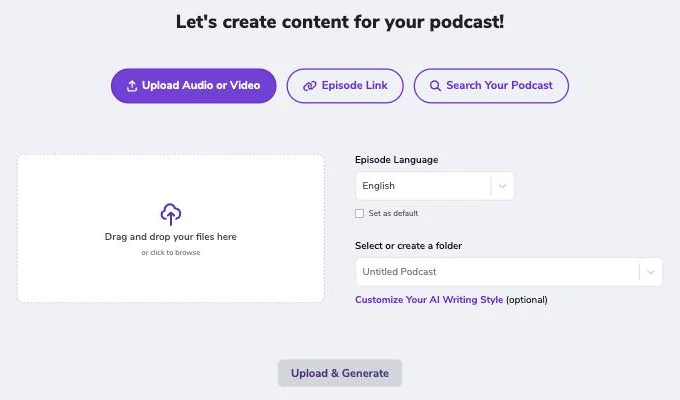
Choose where the episode comes from:
- Upload Audio or Video: drag your file onto the box or click it to browse. You can add several files at once.
- Episode Link: paste a Spotify, Apple Podcasts or YouTube link, an RSS feed, or a direct link to an audio or video file.
- Search Your Podcast: type your podcast's name, or click Click here to use your RSS feed instead if it doesn't show up.
-
Check the Episode Language. It must match the language spoken in the episode, because the transcript and all written content use it. Tick Set as default to keep it for next time.
-
Under Select or create a folder, pick the podcast this episode belongs to, or create a new folder. Each folder keeps its own AI writing style.
-
Optionally, fill in Customize Your AI Writing Style to tell the AI how to write (for example: "Professional but friendly tone. Write in the first person.").
-
Start the conversion:
- For a file, click Upload & Generate.
- For a link, click Continue, check that the episode or video shown is the right one, and click Continue again.
- For a podcast search, click See all episodes, pick the episode, and click Generate Content.
-
Wait while Podsqueeze works through the transcript, speakers, timestamps and quotes, show notes, clips, and newsletter and posts. You can close the window: you will get an email titled "Your Episode is Ready".
-
Open the episode from your Dashboard to see its Results Page.
Limits
- Minutes: an episode uses as many minutes as it is long, rounded up to the next minute. If it is longer than the minutes you have left, Podsqueeze shows "Not enough minutes" and doesn't start. Minutes are taken only when processing finishes.
- File size: up to 4 GB on Free and Starter, up to 10 GB on Pro and above.
- Free plan: one file upload (including direct links to a file) and one YouTube video. After that, uploads and YouTube links need a paid plan. Episodes from podcast search, RSS feeds, Spotify and Apple Podcasts links still work while you have minutes.
- Formats: MP3, WAV, M4A, MP4, MOV, MKV, WebM, FLAC and OGG. See Supported file formats and limits.
Troubleshooting
- "The audio format is not supported." Convert the file to MP3 or MP4 and upload it again.
- A large video uploads slowly. If the upload will take more than about 10 minutes, Podsqueeze offers Extract Audio to upload only the audio track, which is much faster. Clips for an audio-only upload are made as audiograms.
- Processing takes much longer than usual. See Processing is stuck.