Podsqueeze transcribes episodes in 49 languages. You choose the language under Episode Language before converting, and the transcript and all the written content (show notes, titles, posts, newsletter and so on) come out in that language.
Steps
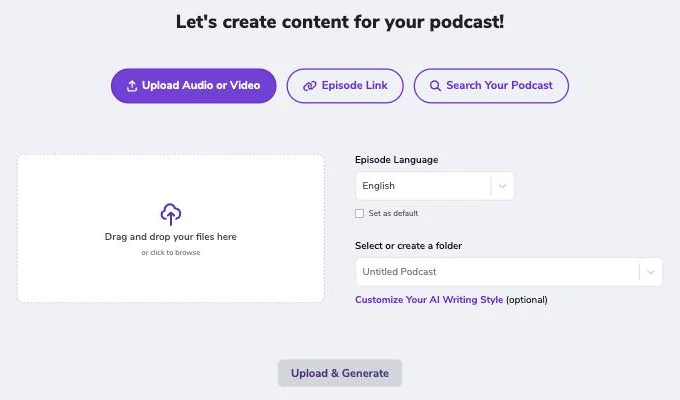
- On your Dashboard, click Convert Audio or Video.
- Under Episode Language, pick the language spoken in the episode. You can type to search the list.
- Tick Set as default if you usually record in that language. Podsqueeze then pre-selects it the next time you convert in this browser.
- Convert the episode as usual.
Supported languages
Arabic, Bashkir, Basque, Belarusian, Bulgarian, Cantonese, Catalan, Croatian, Czech, Danish, Dutch, English, Esperanto, Estonian, Finnish, French, Galician, German, Greek, Hindi, Hungarian, Indonesian, Interlingua, Italian, Japanese, Korean, Latvian, Lithuanian, Malay, Mandarin, Marathi, Mongolian, Norwegian, Persian, Polish, Portuguese, Romanian, Russian, Slovak, Slovenian, Spanish, Swedish, Tamil, Thai, Turkish, Ukrainian, Uyghur, Vietnamese, Welsh.
Good to know
- Pick the spoken language, not the one you want the content in. The transcript is made for the language you choose. If you pick the wrong one, the transcript will be wrong and the written content with it, and you'll need to convert the episode again.
- Written content follows the episode language. A Spanish episode gets Spanish show notes, titles and posts.
- Default language: without a saved default, the selector starts on the language of the Podsqueeze site you are using.
- The Podsqueeze site and app are available in 15 languages: English, Arabic, Chinese, Dutch, French, German, Italian, Japanese, Korean, Polish, Portuguese, Russian, Spanish, Thai and Vietnamese. This is separate from the episode language.
Troubleshooting
- The transcript is in the wrong language or is gibberish. The episode was converted with a different Episode Language from the one spoken. Convert it again with the right language.
- Names or brand terms are misspelled. Add them to your folder's spelling list; see Fix speaker names and spelling.