Podsqueeze takes an audio or video episode and creates the content around it: a transcript, show notes, timestamps, titles, social posts, short clips, quote images and an audio editor. You give it the episode once, and everything is collected on one Results Page per episode.
It is used for podcasts, but it works with any recorded talk: interviews, webinars, YouTube videos, lessons or meetings.
How it works
- You bring in an episode from your Dashboard with Convert Audio or Video. You can upload a file, paste a link (Spotify, Apple Podcasts, YouTube, an RSS feed or a direct link to an audio or video file), or search for your podcast by name.
- Podsqueeze transcribes the episode, identifies the speakers and writes the content. This usually takes 5 to 10 minutes, and you get an email when it is ready.
- You open the episode's Results Page, which has four tabs:
| Tab | What is in it |
|---|---|
| Written content | Full Transcription (with an SRT file), Show Notes, Timestamps, Titles, Links & Mentions, Keywords, Blog Post, Newsletter, LinkedIn & Facebook posts, Tweets, Quotes, Bullet Points, and any custom results you add |
| Clips | Short vertical clips picked by an AI agent. Video episodes get video clips; audio-only episodes get audiograms |
| Images | Thumbnail Maker and Quote Image |
| Edit & Enhance Audio | Cut Silences >3s, Cut Filler Words, Enhance Audio, and export as WAV or MP3 |
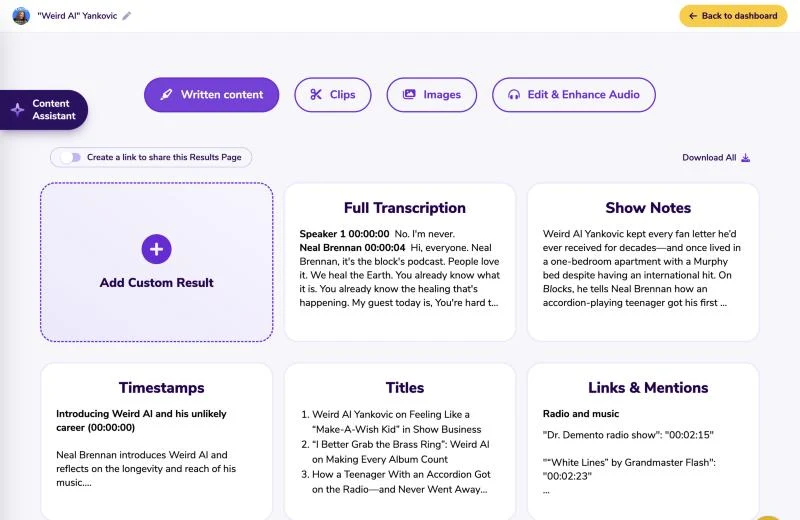
Every result can be edited, copied or downloaded. The Content Assistant on the Results Page answers questions about the episode and writes more content from it.
Good to know
- Plans are based on minutes of audio per month and clips per month: Free 30 minutes and 10 clips, Starter 120 minutes and 20 clips, Pro 320 minutes and 40 clips, Agency Lite 600 minutes and 80 clips, Agency Plus 2,000 minutes and 160 clips, Agency Scale 4,000 minutes and 320 clips. See Pricing.
- Audio enhancement and the audio editor are on Starter and above. Personalized AI voice, the Content agent and branded clip layouts are on Pro and above.
- Languages: Podsqueeze transcribes 49 languages, and the written content comes out in the language you pick for the episode. See Supported languages.
- Folders: each podcast or show gets its own folder, with its own writing style (Personalize AI), a chat across all its episodes and an optional podcast website.
- What it does not do: Podsqueeze does not record, host or publish your podcast, and it does not create a podcast from notes. It works from audio or video you already have.