Open the Clips tab of an episode. Podsqueeze has already suggested clips from the episode; on Pro and above you can also ask the AI agent for the moments you want, in your own words, and it creates the clips for you.
Steps
- Open the episode's Results Page and click the Clips tab.
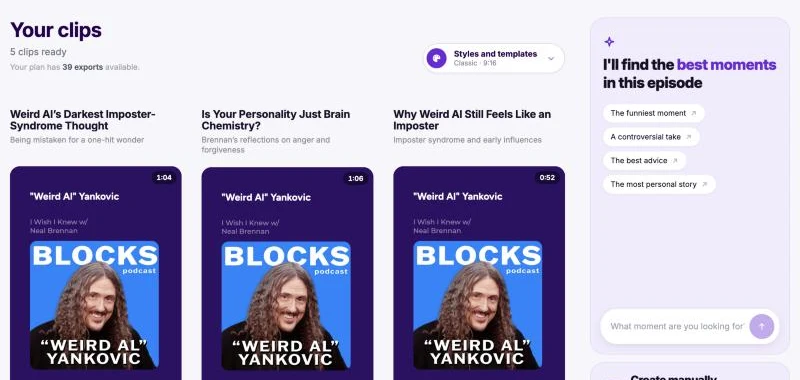
- Under Your clips you see the clips suggested for the episode, each with a title.
- To ask for more, type in the agent panel on the right, in What moment are you looking for?, or click a suggestion: The funniest moment, A controversial take, The best advice, The most personal story.
- Be as specific as you like: a topic, a guest, a mood or a length ("the story about the first sponsor, under 45 seconds"). The agent reads the whole episode and adds the clips to Your clips. If it changes something you don't want, click Undo.
- To make a clip yourself, click Create manually and pick the sentences in the transcript.
- Click Edit on a clip to change it, Export to make the MP4, or Schedule to send it to YouTube Shorts.
Limits
- The AI agent is on Pro and above. On Free and Starter the panel shows "Available on the Pro plan". Suggested clips and Create manually work on every plan. See /pricing/.
- The agent creates up to 5 clips per request.
- Unless you ask for a length, agent clips run about 1 to 2 minutes. You can ask for anything from 8 seconds to 3 minutes.
- Creating and editing clips is free. Only exporting a clip uses one clip from your plan. See Clips per plan.
- There is a daily limit on messages to the agent. If you reach it, the agent tells you to come back the next day.
How the agent picks moments
It looks for moments that make sense on their own, with a strong first sentence and a clean ending. It skips introductions, sponsor reads and "thanks for listening". You can also ask it for a montage or teaser: several short moments from across the episode joined into one clip.
Good to know
- Video episodes get the auto camera, which follows whoever is speaking by voice and lip movement. Audio-only episodes become audiograms. See Audiograms for audio-only episodes.
- The look of new clips comes from Styles and templates at the top of the tab.
- The agent understands requests in any of the 15 interface languages.
Troubleshooting
- "No clips yet." Ask the agent for a moment, or use Create manually.
- "This episode doesn't have a word-by-word transcript yet, so there are no clips to show." Wait for processing to finish and reload the page.
- "The assistant isn't available right now." Try again in a few minutes. You can still make clips with Create manually.