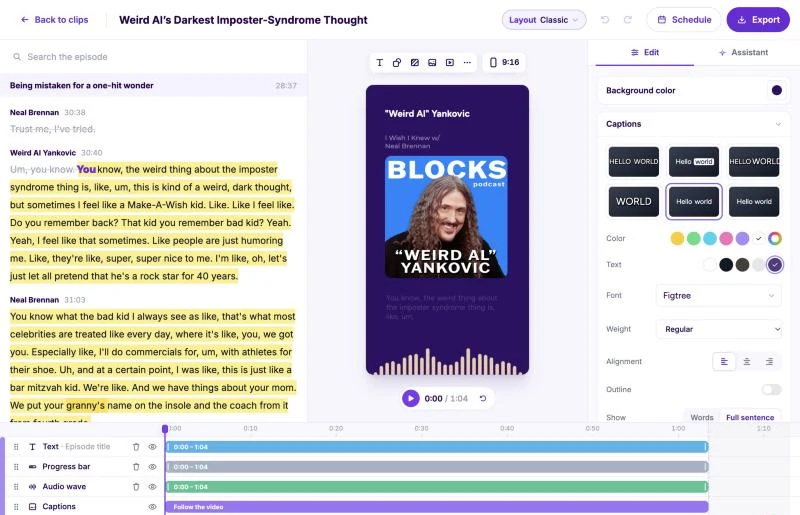
Yes. When an episode has no video, its clips become audiograms: the episode cover, an audio wave that moves with the voice, word-by-word captions and the episode and podcast titles. You make and edit them exactly like video clips.
Steps
- Convert the audio episode as usual (upload, link or podcast search).
- Open the episode's Results Page and click the Clips tab. The suggested clips are already audiograms.
- Click Edit on a clip to change it. The timeline has a track for each element: Text (episode title), Progress bar, Audio wave, Captions, Text (podcast name) and Episode cover.
- Click an element to change it: the wave's style and color, the caption style, the background color, or a different cover image (Use the episode's brings back the episode cover).
- Click Export for the MP4, or Schedule to post it to YouTube Shorts.
Wave styles
| Style | What it looks like |
|---|---|
| Bars | Bars that rise with the sound |
| Line | The waveform, like an oscilloscope |
| Mirror | Bars that grow up and down from the center |
| Thin | Tall, thin bars from the center out |
| Filled | A filled shape that swells with the voice |
| Ring | Bars around a circle to frame the cover |
| Pulse | Thin circles around the cover that expand with the voice |
Limits
- Bars is available on every plan. The other six wave styles are Pro and above. Below Pro, Ring and Pulse are hidden in the export because they have no basic version. See /pricing/.
- Each audiogram export uses one clip from your plan, the same as a video clip. See Clips per plan.
- Formats: 9:16 (vertical), 1:1 (square) and 16:9 (horizontal).
- Free plan exports have a watermark.
Good to know
- The auto camera and split screen are for video episodes only. If you have a video version of the episode, convert that file instead to get clips with the speakers on screen.
- Captions come from the transcript. Fix a misheard word in the editor's transcript and the captions follow. See Edit a clip.