BLOG ARTICLE
Podcast MCP: Transcribe and Clip in ChatGPT and Claude
Last updated: 11/25/2026
A podcast MCP is a connection that lets an AI chat use a podcast tool for you: you ask in ChatGPT or Claude, and the tool does the listening, cutting and rendering the chat can't do itself. The Podsqueeze MCP, at https://mcp.podsqueeze.com/mcp, gives ChatGPT, Claude, Claude Code and Cursor more than 20 tools that transcribe an episode, read and save its show notes and posts, and create, edit and export clips from your Podsqueeze account.
Prices checked 25 Nov 2026.
Key takeaways
- One address, four clients. Claude and ChatGPT ask for the address and open a Podsqueeze page where you paste your API token once; Claude Code and Cursor take the token in a header.
- It runs on your Podsqueeze plan. A 60-minute episode uses 60 transcription minutes, and each MP4 uses one clip export. Pro ($35 a month, billed annually) gives 320 minutes and 40 exports, enough for five one-hour episodes and up to eight clips from each.
- Two clip tools need Pro:
generate_clips(Podsqueeze's clips assistant picks the moments) andedit_clip(changes in plain words). On Free and Starter the chat can still pick moments itself and make clips withcreate_clips. - Say the language. The server doesn't assume English: if you don't name the language and the folder has no earlier episode, the chat asks you before anything is sent.
What is an MCP, for a podcaster?
MCP (Model Context Protocol) is the standard Claude and ChatGPT use to call outside tools. On its own, a chat model reads text and writes text. Connected to the Podsqueeze MCP server, it can send a public audio or video link to be transcribed, read the transcript in pages, ask for show notes in your show's voice, and turn moments into MP4 clips with captions and the speaker in frame. The server keeps no data: every call is made with your Podsqueeze API token, and regenerating that token in Podsqueeze disconnects every chat at once.
What can you ask the Podsqueeze MCP?
Here is the run for a one-hour interview, filmed with two cameras, in one conversation. Each prompt maps to a tool on the server.
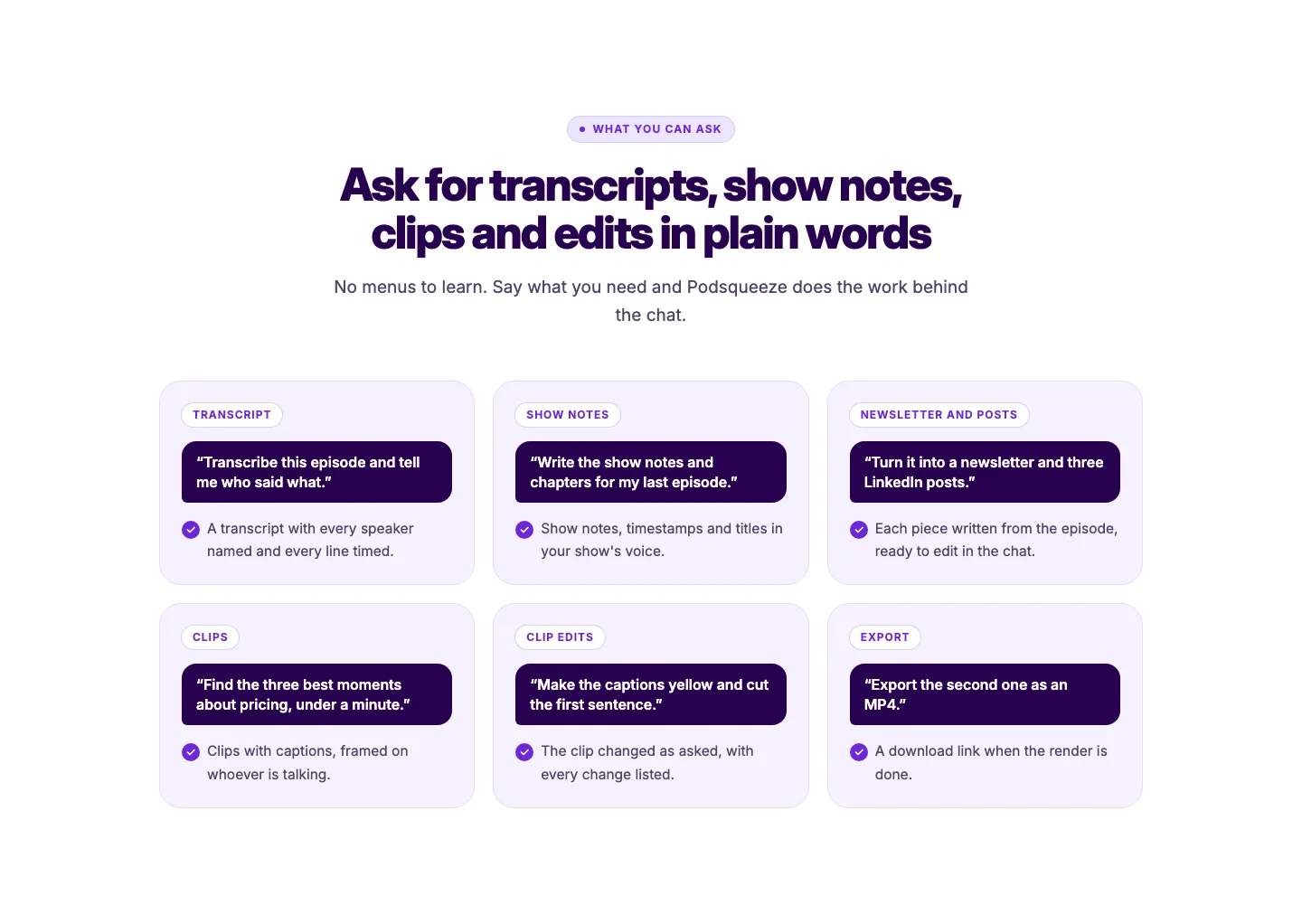 The six kinds of request the Podsqueeze MCP handles, from the Podsqueeze MCP page.
- "Transcribe this episode, it's in French: [public link]." The chat calls
process_episode. It confirms first, because this uses your minutes. A progress card in the chat follows the episode step by step and offers a button to continue when it's ready. The chat can start on clips as soon as the transcript exists, while the show notes are still being written. - "Import this YouTube video and process it."
import_youtubeuses Podsqueeze's own downloader. The Free plan gets one YouTube video, as on the website. - "What did she say about her first sale? Exact words."
get_transcriptreturns numbered sentences with speakers and times, so the answer comes with who said it and when.
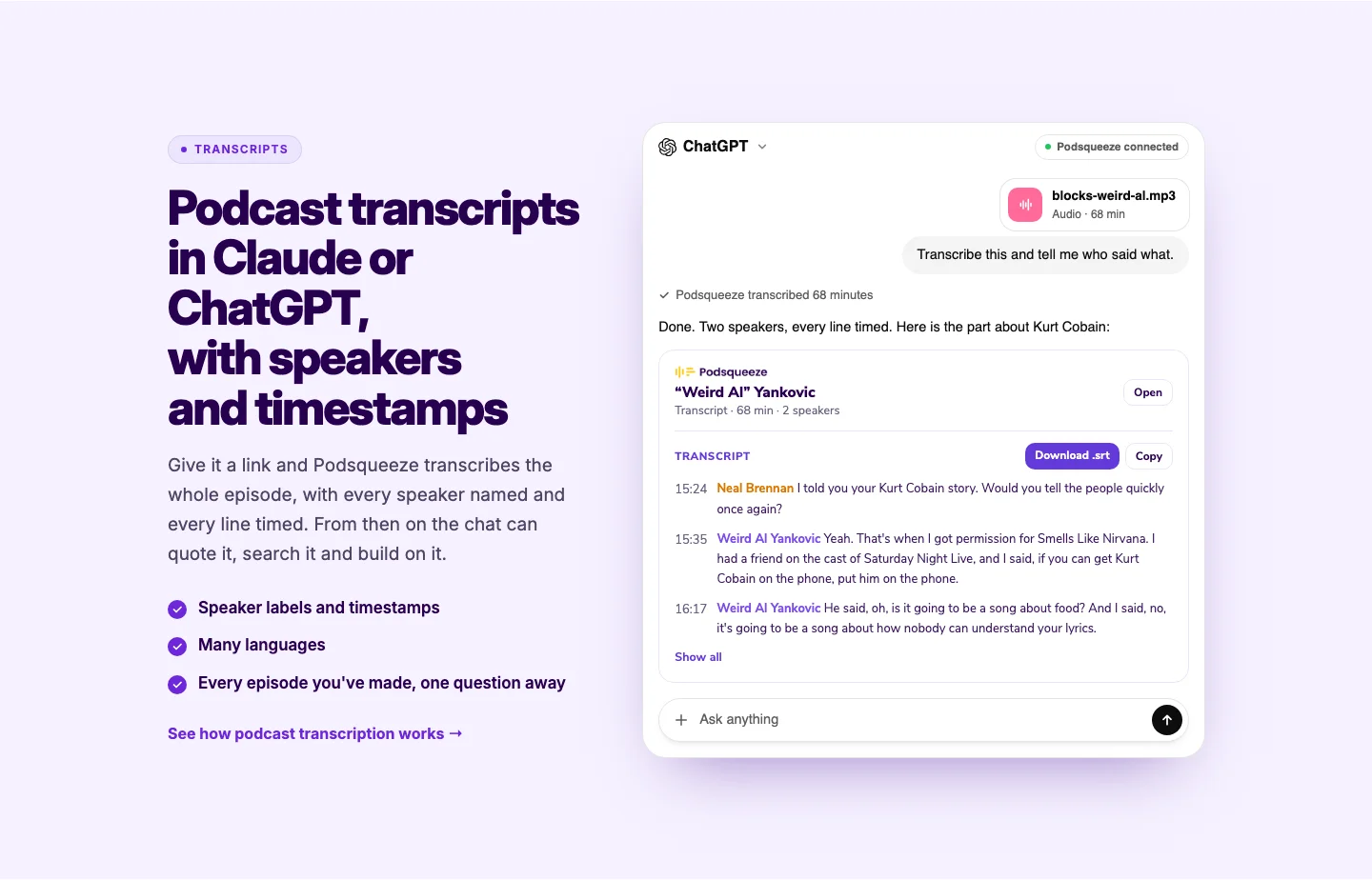 In ChatGPT: a 68-minute episode transcribed with both speakers named and every line timed (Weird Al on Blocks w/ Neal Brennan).
4. "Write the show notes and chapters."
get_content reads what Podsqueeze already made; generate_content creates a missing one. It never regenerates an existing one.
5. "Shorter, punchier intro. Save it." The chat rewrites the text itself, and save_content stores it in Podsqueeze only when you say so. If someone edited that text in Podsqueeze since the chat read it, the save is refused rather than overwriting their change.
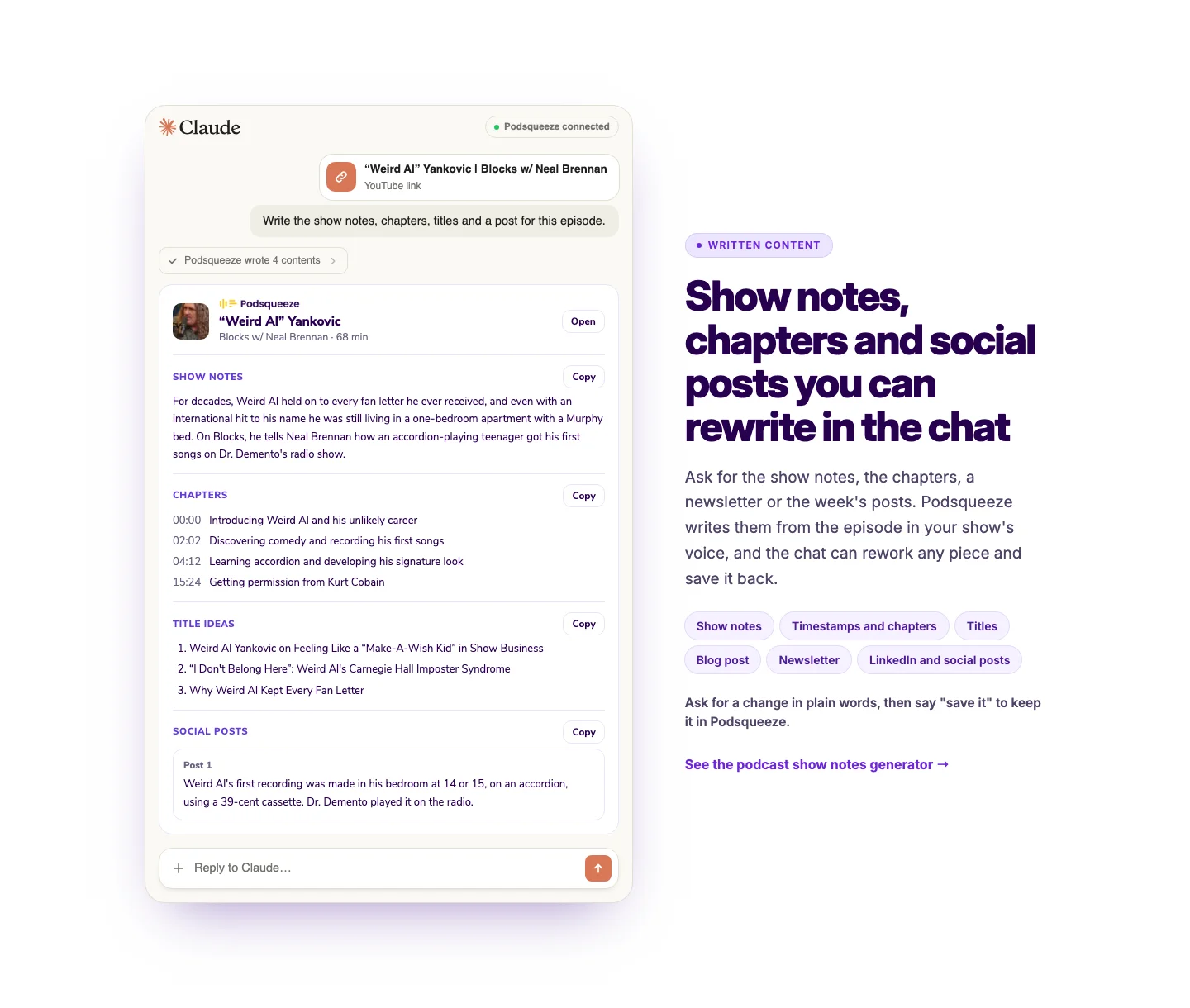 In Claude: show notes, chapters, titles and a post written from one YouTube link, each ready to copy or rewrite.
6. "Pick three moments for Reels, each under 45 seconds." On Pro,
generate_clips hands this to the same clips assistant as the web app, which returns clips with a title and a hook.
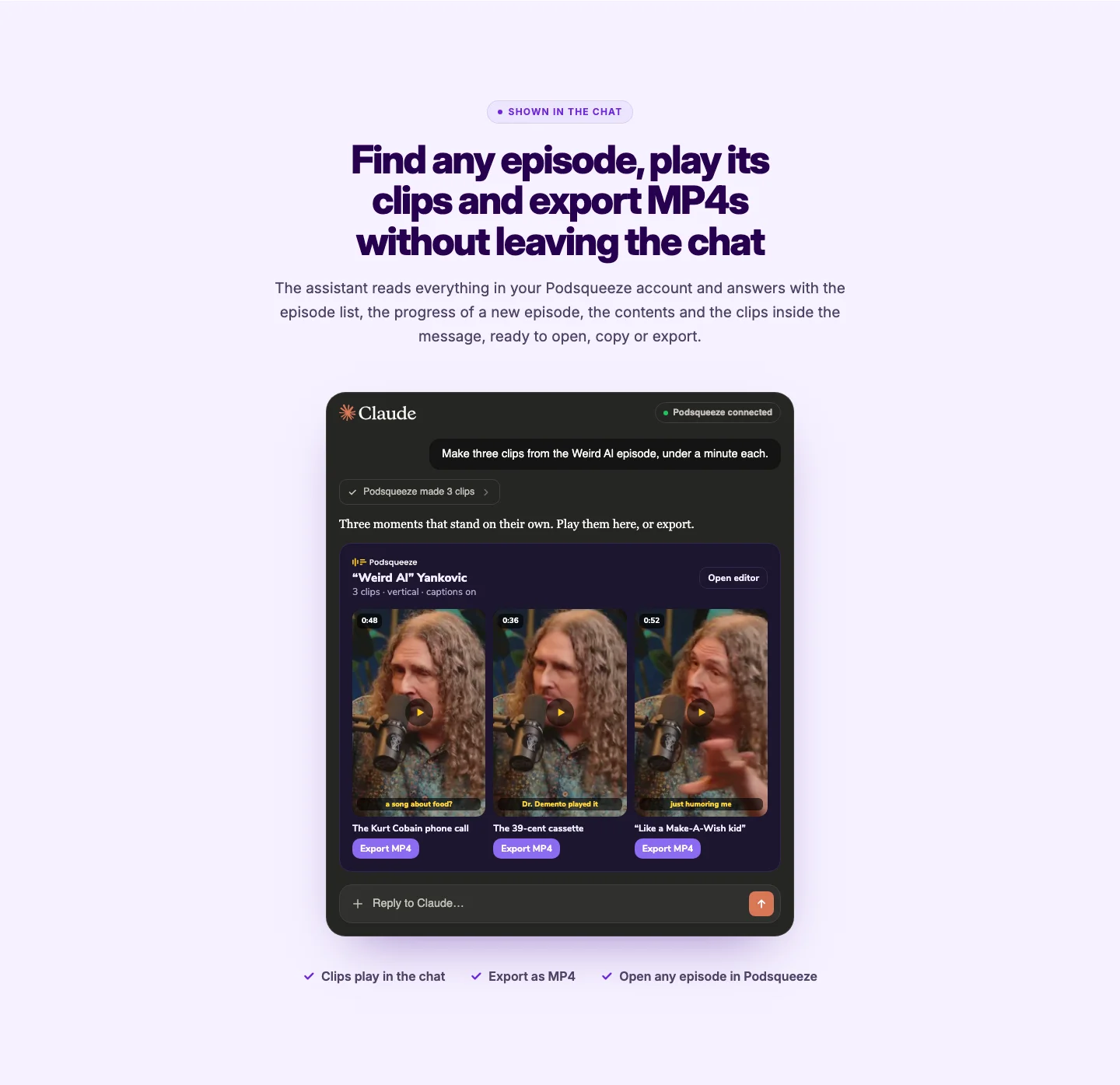 In Claude: three clips under a minute, playing inside the message, each with Export MP4.
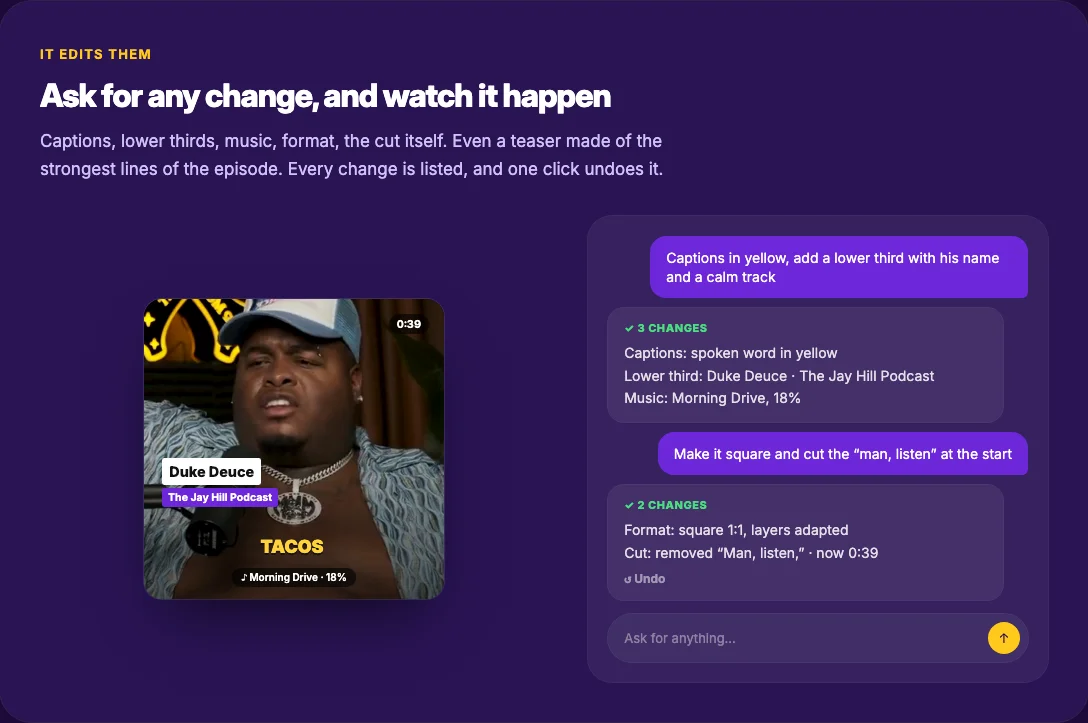
- "Yellow captions, put his name on screen, add quiet music."
edit_clippasses the request to the clip editor's assistant; each change is saved and can be undone in the editor. The same assistant, shown here in Podsqueeze's web clip editor (not the chat) on a Duke Deuce clip from The Jay Hill Podcast, lists each change it made:
- "Export the second one."
export_cliprenders the MP4 andwait_for_exportreturns the download link when the render finishes. Before that,show_clipplays the clip in the chat without spending an export.
Episodes sent from a chat also get Podsqueeze's own clip suggestions: list_clips turns them into clips the first time you ask, so a new upload doesn't come back empty. Every clip also opens in the Podsqueeze clip editor, where the transcript is the timeline.
How do you connect it in ChatGPT, Claude, Claude Code and Cursor?
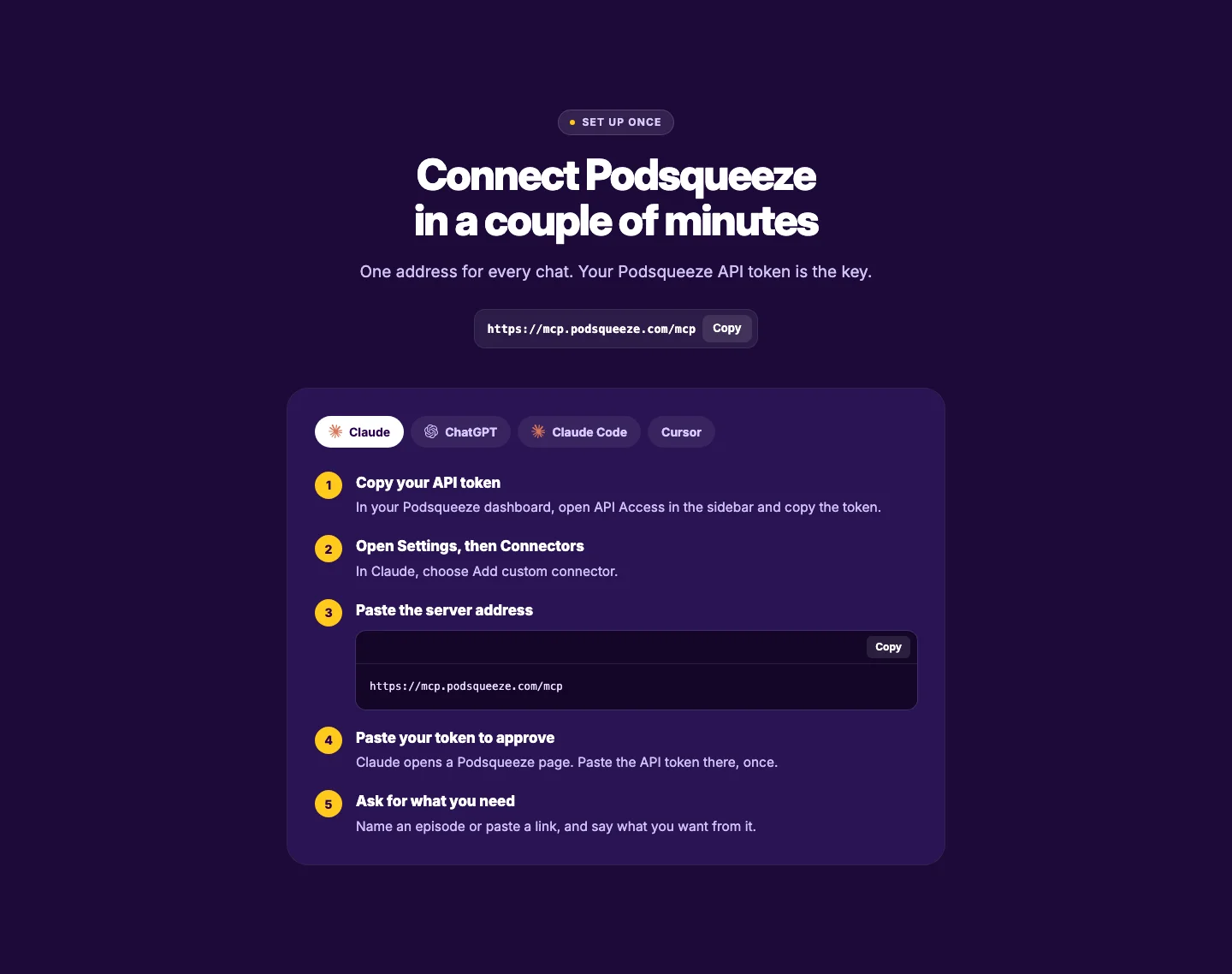 One address for every client; the Podsqueeze MCP page shows the steps for Claude, ChatGPT, Claude Code and Cursor.
First, in your Podsqueeze dashboard, open API Access in the sidebar and copy the token.
Claude (web and desktop). On Pro or Max, go to "Customize → Connectors", click "+ Add", then "Add custom connector", and paste https://mcp.podsqueeze.com/mcp. Claude opens a Podsqueeze page; paste the token there once. On Team and Enterprise an owner adds it under "Organization settings → Connectors". Free Claude accounts can add one custom connector. (Anthropic's guide)
ChatGPT (web). OpenAI's current steps: open chatgpt.com/plugins, select the plus button, "Add custom MCP server", enter a name and the server URL, accept the risk warning and choose "Create as a plugin", then install it. In a chat, type @ and pick Podsqueeze. ChatGPT asks you to confirm write actions, such as sending an episode, by default. (OpenAI's guide) ChatGPT is also the one client where you can attach the audio file to the message instead of a link; Podsqueeze copies it to its own storage, since ChatGPT's file link expires.
Claude Code. One command, with your token in place of <API_TOKEN>:
claude mcp add --transport http podsqueeze https://mcp.podsqueeze.com/mcp --header "Authorization: Bearer <API_TOKEN>"
Cursor. Add this to ~/.cursor/mcp.json:
{
  "mcpServers": {
    "podsqueeze": {
      "url": "https://mcp.podsqueeze.com/mcp",
      "headers": { "Authorization": "Bearer <API_TOKEN>" }
    }
  }
}
In Claude and ChatGPT the sign-in lasts 7 days and renews itself while your API token is valid.
MCP or just uploading the file to the chat?
The difference is what comes back. Without a clip tool, a chat can suggest timestamps but can't cut, frame or render a video. With the MCP, the work lands in your Podsqueeze account: the transcript has speaker labels, timed lines and an SRT export, the clips have face tracking or a split screen and come out at 9:16, 1:1 or 16:9, and the episode is there next week, from any chat you've connected, without transcribing again. The trade-off is that it spends plan minutes and exports.
What does it cost?
| Plan | Price (billed annually) | Transcription minutes / month | Clip exports / month | Clips assistant and editing assistant |
|---|---|---|---|---|
| Free | $0 | 30 | 10 (watermarked) | No |
| Starter | $5.99/mo | 120 | 20 | No |
| Pro | $35/mo | 320 | 40 | Yes |
| Agency Lite | $62/mo | 600 | 80 | Yes |
Only exporting uses a clip; making and changing clips doesn't (clips per plan, pricing). get_account tells the chat what you have left, so "how many minutes do I have?" is a fair question to ask before sending a 90-minute episode.
Where does it trip up?
- Private links fail.
process_episodeonly takes a public, downloadable http(s) link or a file attached in ChatGPT. A Google Drive or Dropbox link that needs a sign-in is refused, so share it publicly or attach the file. - No language, no transcript. Podsqueeze has no automatic language detection, and a French episode processed as English comes back garbled. Name the language in your request; if you don't, the chat reuses the language of the last episode in that folder.
- Big files look stuck. If a large file takes longer to arrive than the API waits, the server tells the chat not to send it again, because a second send makes a second episode and spends the minutes twice. Ask "list the episodes in this folder" a minute later instead.
- The clips assistant has a daily cap from chats: 50 requests per account per day by default, counted apart from the web editor's.
- ChatGPT pauses on writes. Each
process_episodeorexport_clipneeds your confirmation by default, which slows a batch of ten exports.
Skip it if
- You only want a quick transcript of a short voice memo. The Free plan's 30 minutes go fast, and a podcast tool is more than that job needs.
- You never draft in a chat. The Podsqueeze web app, with its clips agent, does the same work with buttons, and the clip editor shows more at once than a chat window.
- You're on Starter and want the assistant to pick and edit clips. Those two tools are Pro; on Starter the chat model has to choose moments itself from the transcript.
FAQ
Can ChatGPT transcribe audio? With the Podsqueeze MCP connected, ChatGPT sends the episode to Podsqueeze and gets back a full transcript with speakers and timestamps, saved in your account. More on the ChatGPT transcription page.
Can Claude transcribe audio? Yes, the same way: Claude passes a public link (or an episode already in Podsqueeze), and Podsqueeze transcribes it in the language you name. See Claude audio transcription.
Can Claude or ChatGPT make clips? Not on their own. Through the Podsqueeze MCP, either one can create clips from sentences it chose, or on Pro ask the clips assistant to pick them, then edit and export MP4s. The Claude clip maker and ChatGPT clip maker pages show examples; the video clipping MCP covers long videos that aren't podcasts.
Is there a daily limit on asking the assistant for clips from a chat? Yes: 50 requests to the clips assistant per account per day by default, separate from the web editor's limit. Exports are capped by your plan, not by the chat.
Repurpose your podcast content with AI