You delete your account yourself from Account settings. Deleting is permanent: it erases all your content and your login, and it cannot be undone. If you have a paid subscription, cancel it first; the account can only be deleted once it is on the Free plan.
Steps
- If you are on a paid plan, cancel it under Account › Billing › Cancel Subscription (see upgrade, downgrade or cancel) and wait until the paid period ends and the account is on Free.
- Download anything you want to keep, such as transcripts, written content, clips and audio. See download all content.
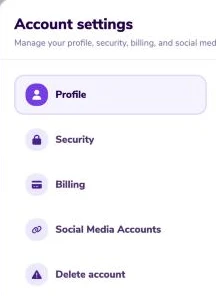
- On your Dashboard, click Account in the sidebar.
- Open Delete account and click Delete Account.
- Confirm "Are you sure you want to delete your account? This action cannot be undone."
- You see "Your account has been successfully deleted." and you are logged out.
Good to know
- Deletion is permanent. All episodes, transcripts, written content, clips and your login details are erased. They cannot be recovered afterwards.
- Paid plans: if you click Delete Account while a paid subscription is active, you see "Please cancel your active paid subscription first." After you cancel, the plan stays active until the end of the billing period, so deleting is possible only after that date.
- Deleting is not cancelling. If you only want to stop being charged, cancelling is enough. Your account then moves to the Free plan.
- Only you can do it. Support cannot delete an account on your behalf; use the steps above while signed in to the account you want to remove.
Troubleshooting
- "Something went wrong and we were not able to delete your account." Log out, log back in and try again. If it still fails, email support@podsqueeze.com from the account's email address.
- You have two accounts. Each email address is a separate account. Sign in to the one you want to delete before following the steps.