You manage your subscription yourself from the Dashboard. Upgrades take effect immediately and keep your current minutes. Cancelling stops the next renewal, and your plan stays active until the end of the period you already paid for.
Steps
Upgrade
- On your Dashboard, click Upgrade Plan in the sidebar (or Upgrade your plan here. in the top banner).
- Confirm the plan offered in the upgrade window, or open the pricing page, pick any higher plan and click Upgrade Subscription.
- From a monthly plan: a new billing period starts today at the new plan's price. "You will keep all your current minutes."
- From an annual plan to a higher annual plan: you are charged the prorated amount for the rest of your current year, and your renewal date stays the same.
- In both cases your remaining minutes are kept and the new plan's minutes are added on top.
Cancel
- On your Dashboard, click Account in the sidebar.
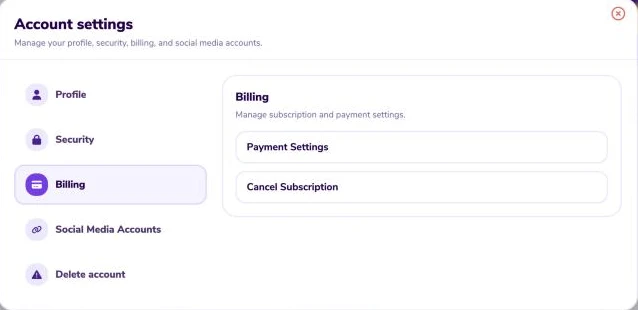
- Open Billing and click Cancel Subscription.
- Click I Still Want To Cancel, choose a reason, answer the short question and click Next.
- If an offer is shown, click No thanks, cancel anyway to continue.
- Answer the last question and click Confirm Cancellation.
Only the account owner can cancel. Podsqueeze support cannot cancel a subscription for you, so use these steps.
Downgrade
There is no direct switch to a lower plan or from annual to monthly. To move down:
- Cancel your current subscription (steps above).
- Wait until the current period ends. The sidebar shows when your plan resets.
- When the account is back on Free, subscribe to the lower plan from the pricing page.
Good to know
- After cancelling, the sidebar shows your plan as "(cancelled)" and you keep all its features until the end of the billing period. Then the account moves to the Free plan (30 minutes and 10 clips every 30 days).
- Rolled-over minutes are lost when a paid plan ends. See minutes and rollover.
- Cancelling during a free trial ends the trial right away and moves the account to Free. No charge is made.
- Invoices and card details are under Account › Billing › Payment Settings, which opens the billing portal.
- Your converted episodes stay in your Dashboard when you upgrade.
- Cancelling is not the same as deleting your account. See delete your account.
Troubleshooting
- "Your current subscription is still running." You cannot buy a new plan while a subscription is active or still running after cancellation. Wait until it ends, or upgrade instead.
- The billing portal email never arrives. The link is sent to the email you used at checkout, which may be different from your Podsqueeze login email. Check that inbox and its spam folder.
- Refunds follow the refund policy. Forgetting to cancel before a renewal is not refunded.