PRODUCT FEATURE
Timestamped Transcript Generator
Last updated: 10/21/2026
Turn any audio or video recording into a timestamped transcript with automatic speaker labels in minutes. Podsqueeze adds precise timestamps to every line, identifies who is speaking, and exports SRT files — so you can cite quotes, build chapters, and publish accessible content without manual transcription.
Generate Timestamped Transcript














TIMESTAMPING IN TRANSCRIPTION
Speaker labels and timestamps on every line
Word-level timestamps
Every segment in your transcript includes accurate timestamps — down to the second — so you can jump to exact moments, create clickable chapters, and sync captions to your video without guesswork.
Automatic speaker labels
Speaker diarization identifies each voice in your recording and labels them clearly. Multi-guest podcasts, interviews, and panel discussions stay organized and easy to read, quote, and edit.
Faster than manual services
Skip the 24–48 hour turnaround of human transcription services. A 60-minute episode is timestamped and speaker-labeled in under 5 minutes — at a fraction of the cost of per-minute human rates.
THREE-STEP WORKFLOW
How to get a timestamped transcript with speaker labels
1. Upload your audio or video
Sign up for a free Podsqueeze account and upload your recording — or search for your podcast by name. We accept MP3, MP4, WAV, M4A, and all major formats.2. AI adds timestamps and speaker labels
Our transcription engine converts speech to text while applying timestamping in transcription at every segment. Speaker labels in transcription are added automatically, distinguishing hosts, guests, and co-hosts.3. Download, edit, or repurpose
Export your timestamped transcript as plain text, Word, or SRT for subtitles. Use the built-in editor to adjust speaker names, then generate show notes, chapters, clips, and social posts from the same file.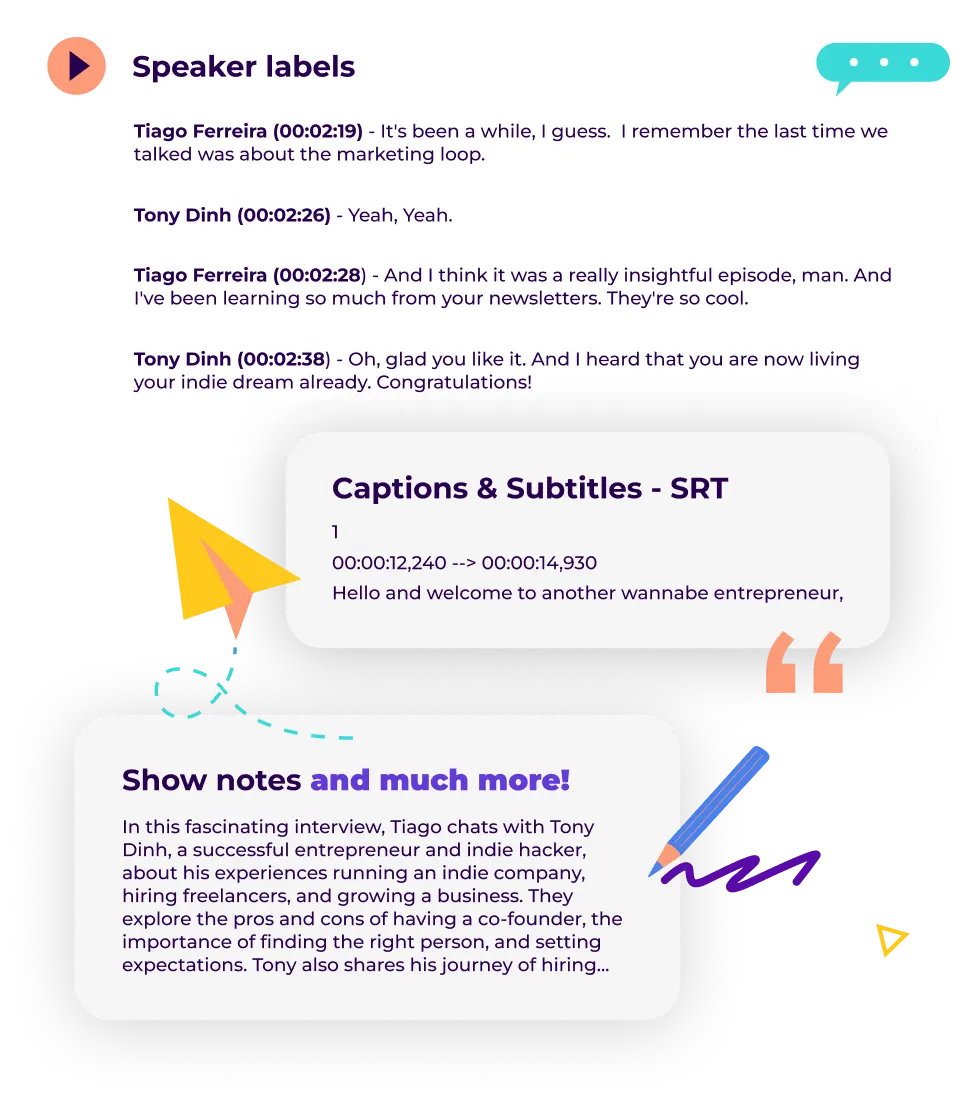
TIMESTAMPED TRANSCRIPT FAQ
Everything about timestamping and speaker labels in transcription
What is timestamping in transcription?
Timestamping in transcription means attaching a time code to each segment of text — typically inHH:MM:SS format — so you can locate any moment in the original recording instantly. Podsqueeze adds timestamps automatically during transcription, eliminating hours of manual time-coding.
What are speaker labels in transcription?
Speaker labels in transcription identify who said what in a multi-voice recording. Also called speaker diarization, this feature tags each line with a speaker name (e.g., "Host:", "Guest 1:") so interviews, co-hosted shows, and panels remain readable and quotable.How accurate are the timestamps and speaker labels?
Podsqueeze delivers human-level transcription accuracy with timestamps aligned to the audio. Speaker identification works best with clear audio and distinct voices. You can rename speakers and fine-tune labels in the editor after generation.Can I export timestamped transcripts for subtitles?
Yes. Download your transcript as an SRT file with embedded timestamps — the standard format for video captions on YouTube, social media, and podcast video players. Also try our SRT File Generator for dedicated subtitle workflows.Is there a free option?
Our free plan includes 30 minutes of transcription per month with full timestamping and speaker label features — no credit card required.How does this compare to human transcription services?
Human services like GoTranscript or Speechpad deliver high accuracy but charge $1–$2 per minute and take 24–48 hours. Podsqueeze provides instant timestamped transcripts with speaker labels at a fraction of the cost, plus one-click repurposing into show notes, chapters, and clips.What other transcription tools do you offer?
For podcast-specific workflows, see Podcast Transcription, AI Podcast Transcript Generator, and Transcribe Podcast to Text. For developers, use our Transcription API or Podcast Transcript API. Need edits? Try Transcript Proofreading.Do more with your timestamped transcript
Build clickable chapters from timestamps
Turn timestamped segments into Spotify-ready chapters with one click. Listeners jump straight to the topics they care about — improving retention and engagement on every platform.Create clips from labeled speaker segments
Find the best guest quotes or host moments using speaker labels and timestamps. Generate shareable short clips and audiograms for social media without scrubbing through raw audio.Publish accessible, SEO-rich content
Timestamped transcripts with speaker labels make your episodes searchable, quotable, and accessible to hearing-impaired audiences. Publish them alongside episodes to boost discoverability on Google and podcast directories.
MORE RESOURCES FOR YOUR PODCAST
Learn how to get the most out of your content
How to choose a podcast transcription service - costs, benefits and actionable tips
Compare podcast transcription services and learn the pros, cons and costs of hiring human transcription vs AI
Everything you need to know about podcast transcription
Everything You Need to Know about podcast transcription. How to transcribe your podcast and why it matters.
Podcast Show Notes Templates
Everything you need to know about podcast show notes with examples and templates to get you started