BLOG ARTICLE
Best AI Podcast Clip Makers in 2026 (Compared)
Last updated: 11/21/2026
Last updated 16 Nov 2026 · Prices checked 15 Nov 2026
You publish a weekly 45-minute episode. There is no video editor on the team and no spare hours, but you want five or six short clips per episode for Shorts, Reels and TikTok, and show notes you don't have to write. That is the show this comparison is built around: 180 minutes of audio a month and, at five clips an episode, 20 to 24 clips. Every tool below is measured against it.
TL;DR
- Audio-only show that also needs a transcript and show notes: Podsqueeze.
- Video show where vertical polish matters most: Opus Clip.
- Audiograms on a small budget: Headliner, or Wavve for a plain waveform.
- Already editing or recording in Descript, Riverside or Kapwing: use the clip tool inside it.
What to look at before you pick
The feature lists are nearly identical. Five questions separate the tools in practice:
- Does it start from audio? Plenty of podcasts have no video, and some tools only take a video file.
- How is usage metered? Minutes of source, credits, clips and exports behave very differently on a 45-minute episode.
- Who picks the moments? An AI score or you from a list of chapters. Either way you will review.
- What else comes out of the upload? A transcript and show notes save more time than a fourth clip.
- What happens after the free plan? Watermarks, expiry and renewals are where the surprises are.
Most people run the same loop: record, edit the audio, export the finished file, upload it to a clip tool, pick the moments, check the captions, post. The tools differ in how much of that loop they take over.
Why these tools
These seven are the established names for the job, and each is here for a reason you can check:
- Opus Clip announced a SoftBank Vision Fund 2 investment in March 2025 and reports more than 10 million creators. It is rated 4.5/5 from 78 reviews on Product Hunt.
- Riverside holds 4.8/5 from 1,758 reviews on G2, and Descript holds 4.6/5 from 936.
- Headliner says 1.5 million people use it, and its mobile app is rated 4.8/5 on the App Store from about 5,000 ratings.
- Podsqueeze says 70,000 content creators and podcast professionals use it, and its site quotes the co-founder of Transistor.fm and the COO of Podigy Podcasts.
- Kapwing is a full browser video editor with an AI podcast clip maker. Wavve is one of the oldest audiogram makers and has been part of the Disctopia hosting platform since May 2025.
Between them they cover audiograms, auto-reframed video clips, text-based editing, remote recording and the written content that goes with an episode.
Quick comparison
| Tool | Best for | Entry price (checked 15 Nov 2026) | Free plan |
|---|---|---|---|
| Podsqueeze | Audio-first podcasts that also need transcripts and show notes | $5.99/mo billed annually ($8.99 monthly), 20 clips a month | Yes, 30 min and 10 clips a month, no card |
| Opus Clip | Video podcasts and auto-reframed vertical clips | $15/mo (monthly billing only), 150 credits | Yes, 60 credits a month, watermarked |
| Headliner | Podcast audiograms and cheap promo videos | $7.99/mo billed annually ($9.99 monthly) | Yes, ad-supported, 1 clean audiogram a month |
| Descript | Editors who cut clips from the transcript | $16/mo billed annually ($24 monthly) | Yes, 1 media hour, limited clips |
| Riverside | Remote video interviews, with clips built in | $24/mo billed annually ($29 monthly) | No permanent free plan, the trial asks for a card |
| Kapwing | General video editing with an AI clip tool | $16/mo billed annually ($24 monthly) | Yes, watermarked 720p |
| Wavve | Simple audiograms for social | $7.99/mo (monthly prices shown) | Free trial, no card |
1. Podsqueeze
What it is. Podsqueeze turns one upload into clips plus the written content around the episode. It is the one we know best, so we can be specific.
How it fits. You upload a file, search for your podcast, or paste a YouTube, Spotify or Apple Podcasts link or an RSS feed. The AI finds the key moments, splits the episode into chapters and writes the subtitles. You choose a chapter and one click makes it a clip: an audiogram if the upload was audio, a captioned video clip if it was video. You can change the aspect ratio, colors and fonts, fix subtitles and shorten a clip by deleting subtitle lines. Clips are ready in a few minutes. The same upload also gives you a transcript with speakers, show notes with chapters, a blog post, a newsletter, social posts and quote images. The usual stack is to record in Riverside, Zencastr or Squadcast and drop the finished file in here. The limits: it does not record or edit, there is no virality score and no auto-reframing onto the active speaker.
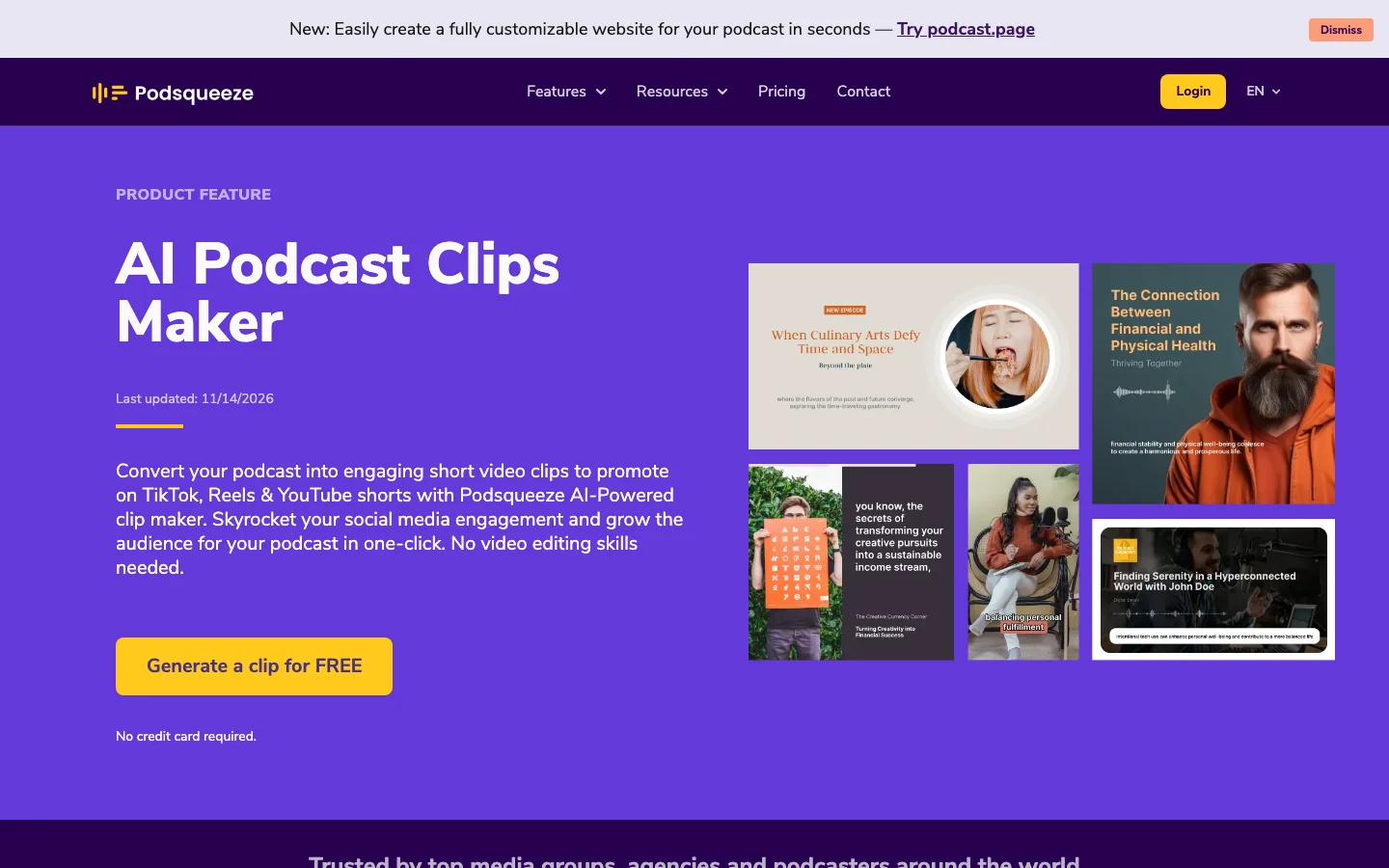 Podsqueeze's clip maker page, checked 15 Nov 2026.
The snag. It is minutes, not clips. Starter includes 120 minutes, which is exactly four 30-minute episodes, so a 45-minute weekly show does not fit and needs Pro. The clip allowance is also a hard monthly number, so a daily show should look at Pro or an Agency plan (up to 320 clips a month).
Compared with the others. Opus Clip is better at vertical video polish. Headliner is cheaper if audiograms are all you want. Podsqueeze is the one that makes sense when the show is audio and you want the transcript and show notes from the same upload.
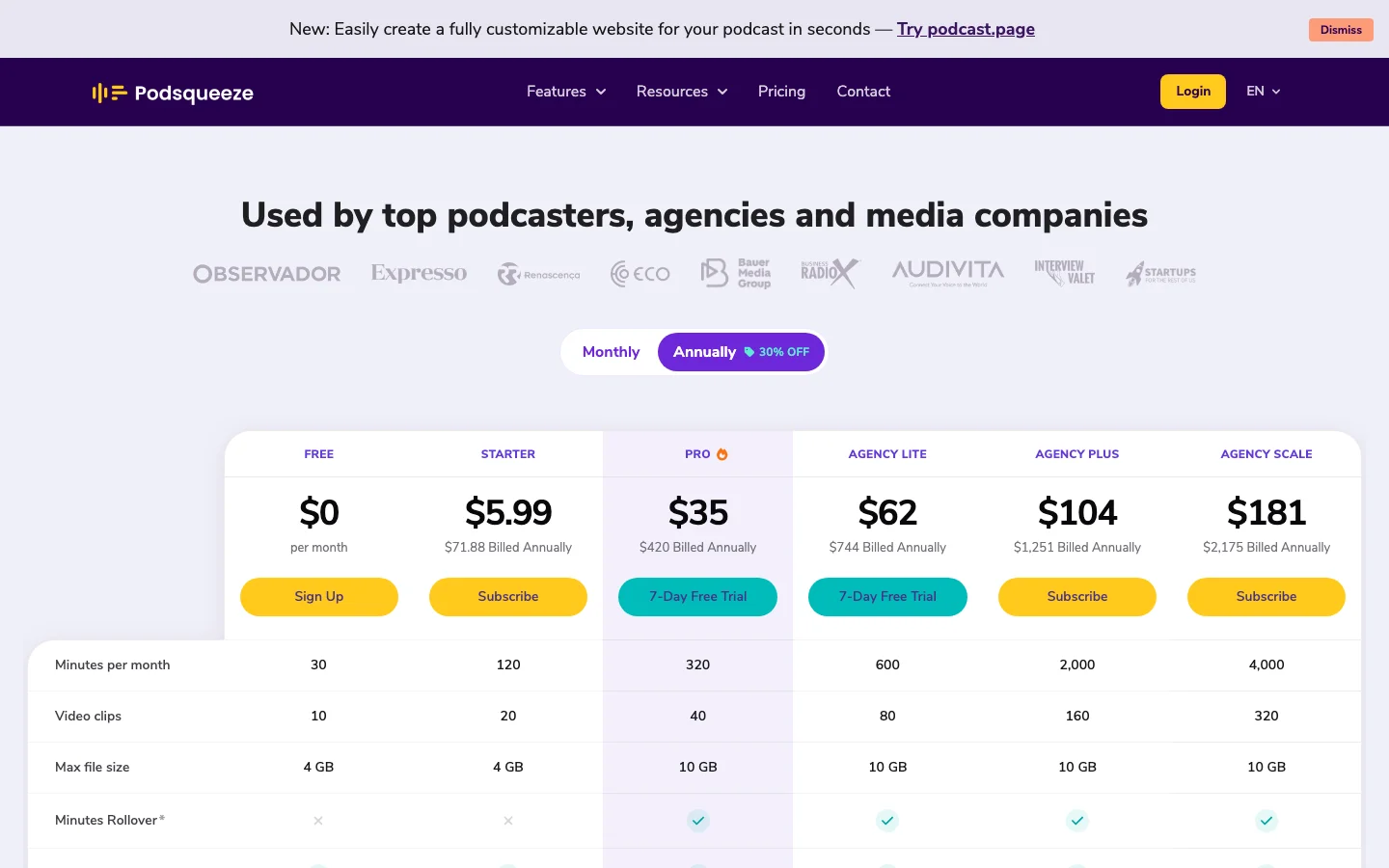 Podsqueeze pricing page, checked 15 Nov 2026.
Against the weekly show
- Price: Pro, $35 a month billed annually ($49 monthly), with 320 minutes and 40 clips, which is ten clips per episode. Unused minutes roll over up to three times the monthly allowance. Starter is $5.99 annually ($8.99 monthly) with 120 minutes and 20 clips. Free is 30 minutes and 10 clips, no card.
- Quality: you pick from chapters and check the captions. Nothing is scored for you.
- Features: audiograms and video clips, transcript, show notes, posts, quote images and a podcast website on Free, audio enhancement from Starter.
2. Opus Clip
What it is. A video tool: long video in, vertical clips out, with animated captions, the frame following whoever is talking, and a Virality Score on each clip.
How it fits. You upload a video or paste a link (YouTube, Apple Podcasts, Riverside, Zoom and others). Starter adds direct posting to YouTube Shorts, TikTok and Instagram, and Pro adds scheduling and more networks. It works best on people talking to camera, and the captions are among the best in the category. An audio-only show has to start from a video version of the episode, and there are no show notes or posts in the clipping product.
The snag. Credits. One credit is one minute of the video you import, however many clips you keep, so a 45-minute episode costs 45 credits whether you pull three clips or twenty. The weekly show uses 180 credits a month. Starter's 150 runs dry during episode four. Pro's 300 covers six episodes. The trick people use is the processing timeframe slider, which processes only the stretch you care about, so you pay for those minutes only.
Quality varies. In one published review, a 59-minute episode came back with 24 clips in about eight minutes. In one published month-long test of 76 clips, 47 were ready to post, 19 needed edits and 10 were unusable. The misses are predictable: a joke cut before the punchline, a quotable line with nothing to do with the episode, and on shows with several hosts, the wrong person in frame. In the same test the Virality Score did not track real results, so we'd read it as a sort order, not a prediction. Free exports are watermarked and expire after three days, so download the same day. Set a reminder before an annual renewal: charges after cancelling and upsell pop-ups are the loudest complaints.
Compared with the others. Better than Podsqueeze at reframing and captions, and cheaper for clips alone. Worse the moment the show is audio-only or you want written content from the episode.
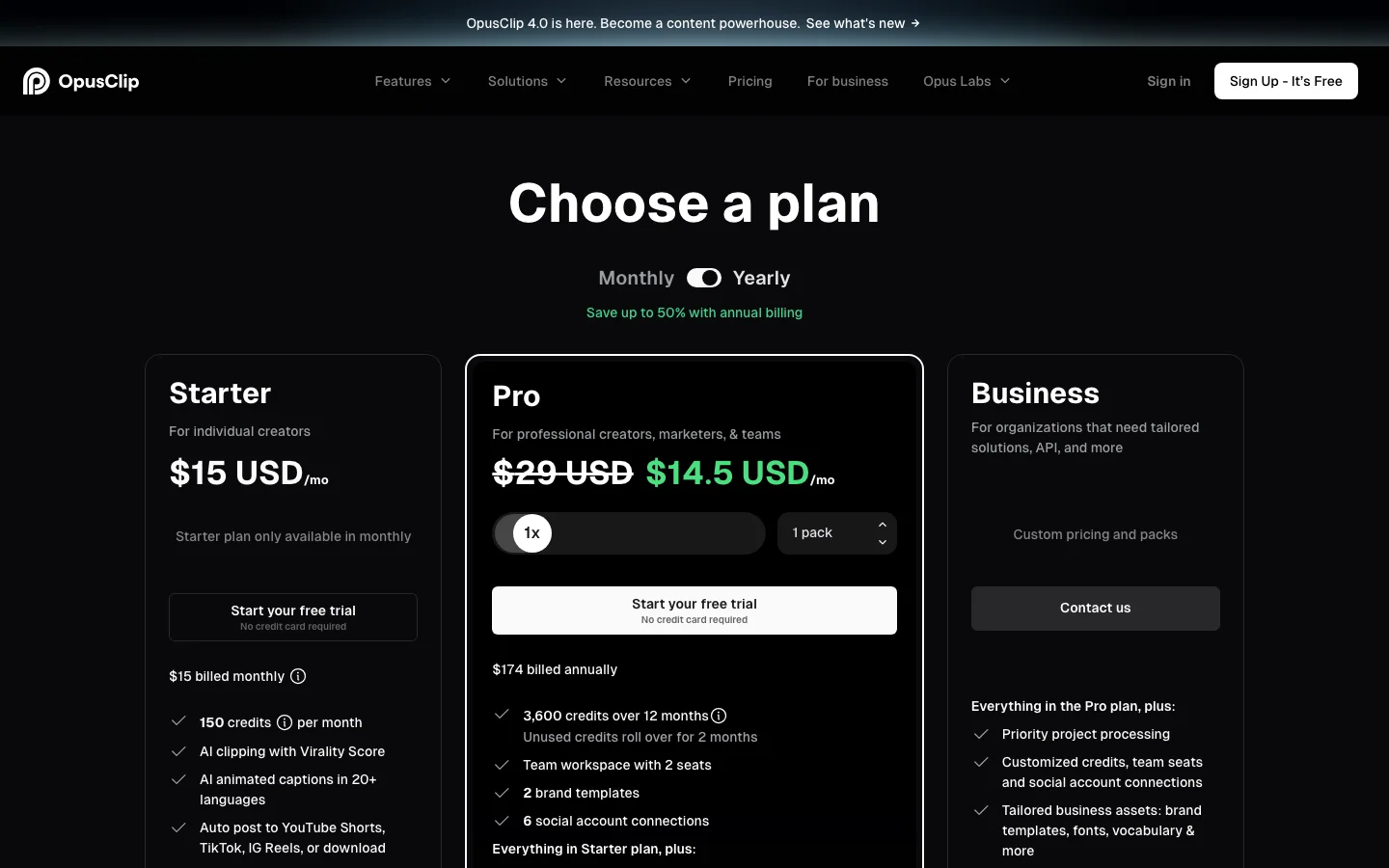 Opus Clip pricing page, checked 15 Nov 2026.
Against the weekly show
- Price: Pro, $29 a month, or $14.50 a month billed annually ($174 a year), with 300 credits. Starter is $15 monthly only, 150 credits. Free is 60 credits.
- Quality: the strongest video clips here, but plan on reviewing every one.
- Features: reframing, captions in 20+ languages, scheduling, posting. No audio-only input, no text outputs.
3. Headliner
What it is. The old hand of podcast audiograms: drop in an MP3 and get an animated waveform video with captions.
How it fits. You can post straight to social networks and YouTube. Its assistant, Eddy, transcribes the episode, suggests clips and writes a "Podcast Promo Pack" with show notes, chapters and social captions. The web editor is the one to use: the mobile app is where people struggle to set a clip's start and end. Customization is thin. Text animations are basic, the template choice is limited, and captions cannot be repositioned in some templates. Transcripts get shaky with several speakers or strong accents, so read the captions before posting.
The snag. The free plan is ad-supported, with unlimited watermarked audiograms and one clean audiogram a month. That is enough to try it and not enough for a weekly show.
Compared with the others. The cheapest way to get a branded promo video every week. It does not search for the best moments the way Opus Clip does, and paid plans list no clip count, so it suits a steady audiogram habit, not a hunt through an hour of video.
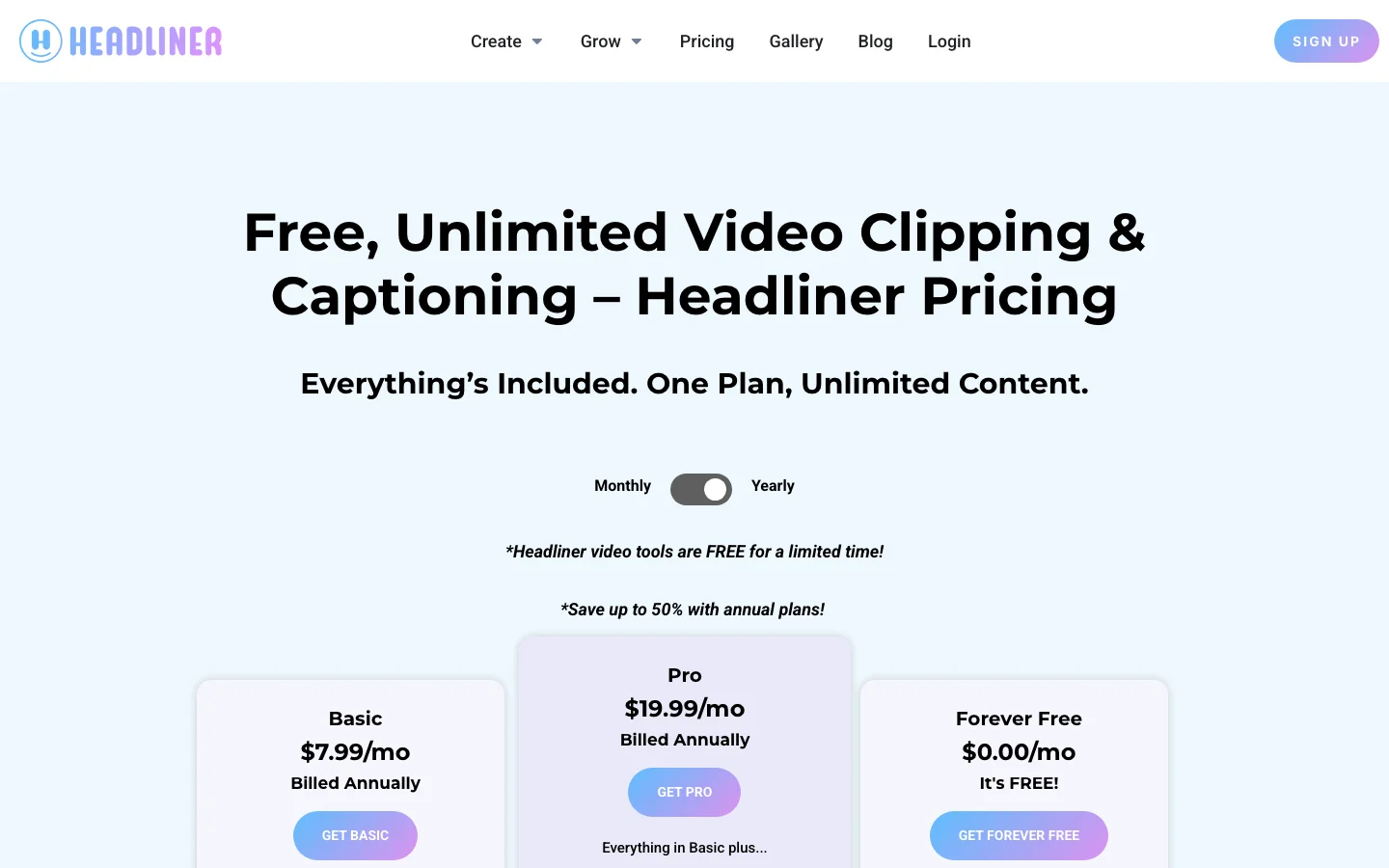 Headliner pricing page, checked 15 Nov 2026.
Against the weekly show
- Price: Basic, $7.99 a month billed annually ($9.99 monthly). Pro is $19.99 annually ($25.99 monthly).
- Quality: good-looking audiograms from an MP3, limited styling.
- Features: audiograms, captions, publishing, promo text. No reframing, no scoring.
4. Descript
What it is. An editor where you edit audio and video by editing the transcript: delete a sentence and it leaves the episode.
How it fits. It publishes straight to Buzzsprout, Podbean, Captivate and Transistor. Create Clips is on Hobbyist and above and limited on Free. The workflow people describe is to do the clip pass at the end of the normal edit, in the same project: strip the filler, pick the best 30 to 45 seconds, let the AI suggest the cuts. Keep Studio Sound for the episodes that need it instead of switching it on for everything.
The snag. AI credits are shared across many features, and weekly podcasters complain that pause cleanup and repeated edits burn through them. Annual renewals catch people out, so note the date. Automatic cuts can sound abrupt, so listen before you export. And vertical clips often get a second pass in another tool for framing and captions.
Compared with the others. The best here for editing, the heaviest for a job that is only clips. If you are not already editing in it, you pay for an editor to use one feature.
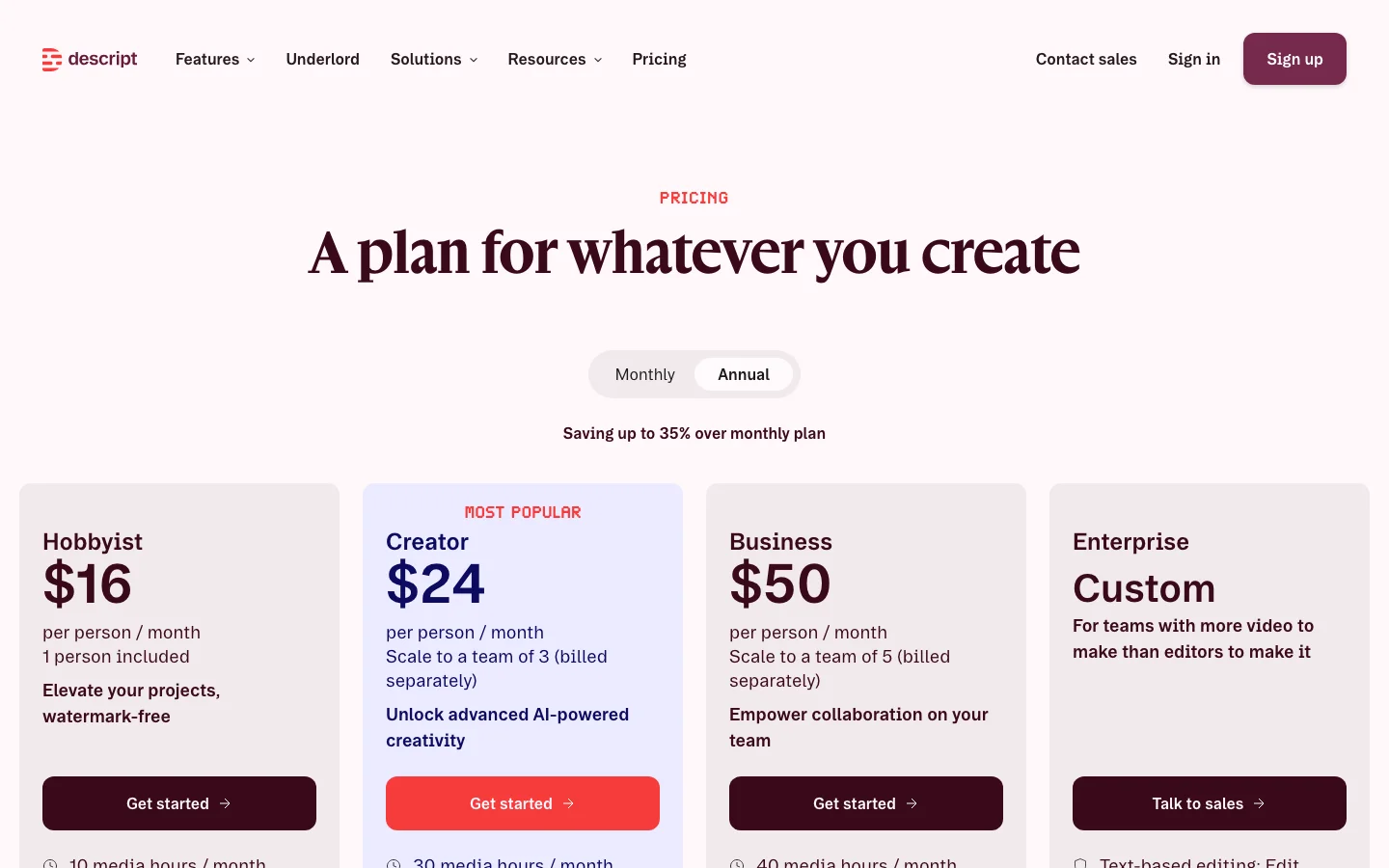 Descript pricing page, checked 15 Nov 2026.
Against the weekly show
- Price: Hobbyist, $16 a month billed annually ($24 monthly), with 10 media hours and 400 AI credits. Creator is $24 annually ($35 monthly) with 30 media hours and 800 credits. Free is 1 media hour and 100 one-time credits. Three hours a month is no problem for media hours, but the credit bill depends on how much you ask the AI to do.
- Quality: precise text-based control.
- Features: transcript editing, Studio Sound, filler removal, hosting integrations, clips.
5. Riverside
What it is. A recording studio first. It records each guest locally in separate tracks, up to 4K video and 48 kHz audio, and holds up when a guest's connection is poor.
How it fits. You record there and the editor adds Magic Clips. Its pricing page lists Magic Clips across the plans and says they do not use AI credits. They save real time, and they find the right topics, but they often get the in and out points wrong, so you still scrub each one. The browser editor gets heavy on long episodes, and long sessions have a history of sync drift and failed uploads. Two habits worth keeping on any platform: record a local backup of every session, and download the separate tracks, not just the mix.
The snag. There has been no permanent free plan since November 2026, and the trial asks for a card. Some people forget to cancel and are charged a full year, so set a reminder the day you start.
Compared with the others. If you record remote video interviews, it is the strongest choice here. If you already have the finished episode, you are paying for a studio you do not use.
Against the weekly show
- Price: Pro, $24 a month billed annually, or $29 monthly.
- Quality: studio-grade recording, clips that need trimming.
- Features: recording, editing, transcripts, hosting, Magic Clips.
6. Kapwing
What it is. A browser video editor with an AI Podcast Clip Maker.
How it fits. The clip maker finds moments in long videos and podcast platform links of up to 2 hours, adds captions, resizes for vertical, focuses on the speaker and makes audiograms. The best reason to pay is collaboration: several people in one project.
The snag. The most repeated complaint is exports that stall or never finish on long projects. Credits get spent on results you did not want, and repeating a job costs more. Editors also note that keyframes are basic. Split long episodes, stay under 2 hours and export a short test first. Free exports are watermarked, 720p and capped at 4 minutes, so the free plan is a demo.
Compared with the others. It is not a podcast tool, so the transcript and show notes come from somewhere else, and Descript is stronger for transcript-based editing. It makes sense if you edit other video too.
Against the weekly show
- Price: Pro, $16 a month billed annually ($24 monthly), with 1,000 credits shared across every AI feature.
- Quality: a flexible general editor, with clips that depend on the credits you spend.
- Features: clip maker, captions, vertical resize, audiograms, collaboration. No show notes.
7. Wavve
What it is. Audio in, waveform video out: animated bars, progress bars, captions and templates, with AI highlights and a post scheduler.
How it fits. It makes the clip and nothing else, so the transcript and show notes come from another tool. A waveform over an image tells someone watching on mute that this is audio. Wavve recommends audio files under 50 MB, with a 150 MB maximum, and an hour of WAV is far bigger, so export an MP3 first.
The snag. Plans are priced by upload minutes. Starter's 70 minutes is one hour-long episode, so a 45-minute weekly show (180 minutes a month) needs Pro. There are no refunds after you pay and no translation. Pricing is shown monthly, so check the page before planning around an annual discount.
Compared with the others. The simplest of the audiogram makers, with fewer extras than Headliner.
Against the weekly show
- Price: Starter $7.99 a month (70 upload minutes, 18 exports), Pro $19.99 (210 minutes, 33 exports), Agency $98.99. Free trial, no card.
- Quality: clean waveform videos.
- Features: audiograms, captions, AI highlights, scheduling.
Our verdict
For this show, we'd pick Podsqueeze Pro. It is the only option here where one audio upload gives you the clips and the show notes, and the numbers fit: 180 minutes against 320, ten clips an episode against the five we wanted.
We'd switch to Opus Clip the day the show is recorded on video and the shorts are the whole point. It is cheaper for clips alone ($14.50 a month billed annually) and better at the video side, as long as you watch the credits. Headliner or Wavve are the answer when the budget is tight and a waveform video is enough. Descript, Riverside and Kapwing answer a different question: use their clip tools only if you already work there.
FAQ
What is the best free AI podcast clip maker?
Podsqueeze gives 30 minutes and 10 clips a month without a card. Opus Clip gives 60 credits with watermarked exports that expire after three days, Headliner gives unlimited watermarked audiograms plus one clean one a month, and Kapwing exports at 720p with a watermark. Free plans are good for trying a tool on one episode and rarely enough for a weekly show. Checked 15 Nov 2026.
Can I make clips from an audio-only podcast?
Yes, but not every tool starts from audio. Podsqueeze and Headliner make audiograms from audio, and Wavve turns audio into waveform videos. Opus Clip works from video, so an audio-only show starts from a video version of the episode.
How many clips should a podcast make per episode?
Three to six is a sensible range for a weekly show, so you can post one or two a week without repeating yourself. Podsqueeze's Starter plan covers about five clips for each episode of a weekly show, and Pro's 40 clips is ten per episode.
Can an AI clip maker pick the best moments by itself?
It can suggest them. Opus Clip scores each clip and Podsqueeze breaks the episode into chapters to choose from. Plan on trimming some clips and throwing a few away, and give each one a quick watch before you post.
Related reading
Repurpose your podcast content with AI